
Online Documentation for SQL Manager for PostgreSQL
AI Assistant commands
AI Assistant commands let you send a request without writing it in the input field: the data goes to the assistant straight away, together with a ready-made prompt template.
There are six commands in all. Four of them are in the AI Assistant submenu, available in Query Data, the SQL Script editor and the editors of views, procedures, functions and triggers.
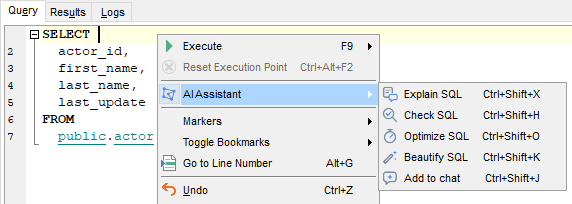
- Explain SQL — asks the assistant to explain what the query does;
- Check SQL — asks the assistant to check the query for correctness, security issues and adherence to best practices;
- Optimize SQL — asks the assistant to suggest optimizations and explain each change;
- Beautify SQL — asks the assistant to format the query without changing its meaning.
The fragment is attached according to the same rules as when you add context manually — see Adding context for details.
Unlike the commands, the Add to chat item in the same submenu only attaches the SQL fragment; you write the request yourself.
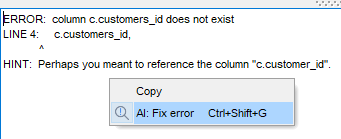
- Fix error — asks the assistant to find the cause of an error and suggest a fix. The command is available in the context menu of the message area in Query Data, the SQL Script editor and the procedure and function editors. It is also available in the Changing Metadata window. The error message is sent together with the statement that caused it.
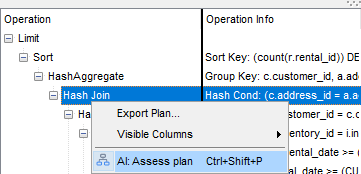
- Assess plan — asks the assistant to review the execution plan of a query: point out bottlenecks and give recommendations. The command is available in the context menu of the Plan tab in Query Data.
The prompt templates used by the commands can be edited on the Templates tab.
See also: