
Online Documentation for SQL Manager for PostgreSQL
Templates
The Templates tab lets you define prompt templates — the instructions sent to the AI Assistant when you run one of its commands from the SQL editors, the message areas or the query plan viewer. The template is sent as the text of the request, and the SQL query, error message or execution plan is attached to it.
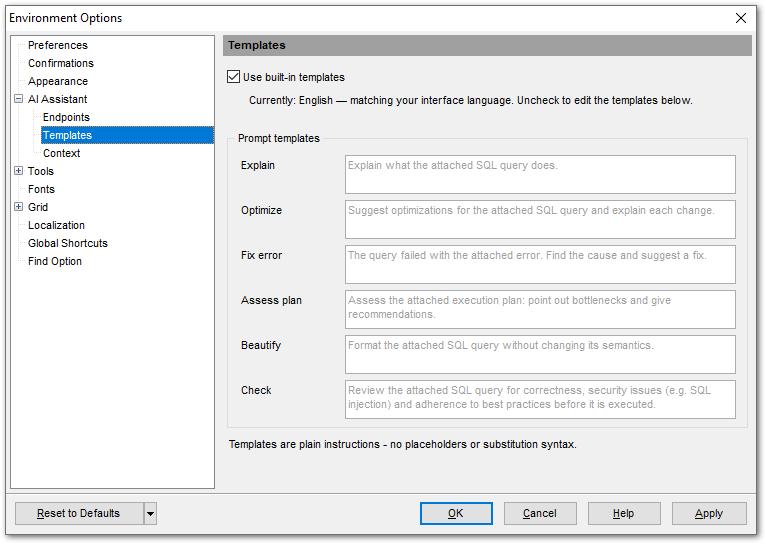
The  Use built-in templates option is selected by default. The built-in templates follow the interface language, or the one selected in the Conversation language field if the program interface supports it. For any other language the English templates are used.
To edit the templates, clear the check box. You can then write the text for each of the AI Assistant commands yourself. The language of these templates is up to you — they are sent to the assistant exactly as they appear in the fields of the Prompt templates group. Your wording is remembered and is not reset to the standard one if you turn the Use built-in templates option on and off again.
Prompt templates
The table below lists the commands and the standard templates used for them:
|
Command |
Default template |
|
Explain |
Explain what the attached SQL query does. |
|
Optimize |
Suggest optimizations for the attached SQL query and explain each change. |
|
Fix error |
The query failed with the attached error. Find the cause and suggest a fix. |
|
Assess plan |
Assess the attached execution plan: point out bottlenecks and give recommendations. |
|
Beautify |
Format the attached SQL query without changing its semantics. |
|
Check |
Review the attached SQL query for correctness, security issues (e.g. SQL injection) and adherence to best practices before it is executed. |
Note: A template is a plain instruction. It has no placeholders or substitution syntax: the SQL query, the error message and the execution plan are attached to the request and appear in the assistant panel as chips.
See also: