
Online Documentation for SQL Manager for PostgreSQL
Context
Context is the data sent to the assistant together with your request: an SQL query, the DDL of database objects, an error message, an execution plan or a file you have attached. Nothing is sent to the assistant unless you add it to the context. The context you provide has a direct effect on how useful the answer is.
Each item of context appears as a chip above the input field, showing the data type, the source and the size in tokens — for example, DDL · public.address · 1K. The type tells you what has been attached: SQL for a query fragment, DDL for a description of database objects, File for an external file, Error for an error message and Plan for an execution plan. To see what a chip holds, point to it with the mouse: the tooltip shows the first few lines of its contents.
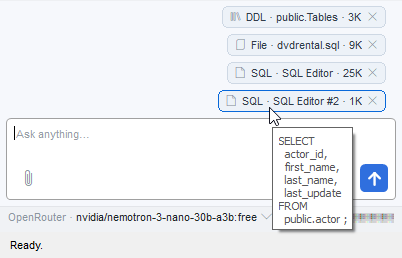
Chips accumulate above the input field until you send the message. If you attach several chips of the same type with the same name, the labels are numbered #2, #3 and so on. To remove a chip before sending, click the cross on the chip. The New Chat button removes all unsent chips.
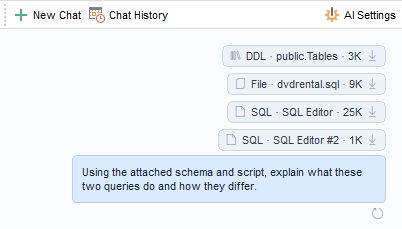
Once the message has been sent, the chips remain in the chat view above the message they were attached to, where they can no longer be changed or removed. To save the contents of a sent chip to a file, click the chip.
Note: Only metadata — the DDL of database objects — goes into the context. The data stored in those objects is never included.
Hint: Chip sizes are given in tokens rather than bytes — the unit a model uses to measure text. The total context accumulated over the conversation is shown in the status bar.
To learn how to add data to the context, see Adding context.
See also: