
Online Documentation for SQL Manager for PostgreSQL
Adding context
There are several ways to add data to the context: the context menu of the editors, the context menu of the Database Explorer, the paperclip button in the assistant panel, and AI Assistant commands.
- Editors
The AI Assistant | Add to chat item is available in the context menu of Query Data and the SQL Script editor. The item adds the selected code fragment to the context. If nothing is selected and the cursor is inside a statement, that statement is selected automatically and added in full.
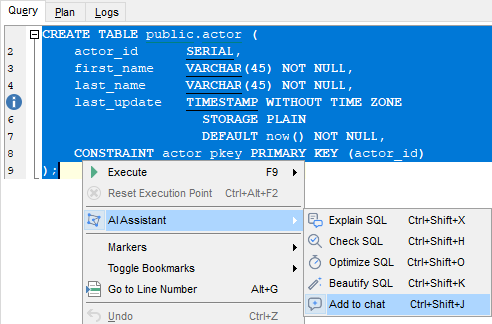
In the editors of views, procedures, functions and triggers, the AI Assistant submenu is available in the working area that holds the object text. Add to chat adds the selected fragment to the context. If nothing is selected, the whole text in the area is added.
- Database Explorer
The context menu of the Database Explorer provides the AI Assistant submenu. The items available depend on the type of node.
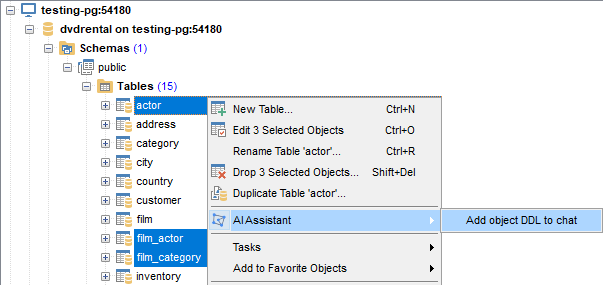
Add object DDL to chat — attaches the DDL of the selected object. The item is available for a database, a schema and individual objects, including a multiple selection. The filters set on the Context tab do not apply: the DDL is sent in full.
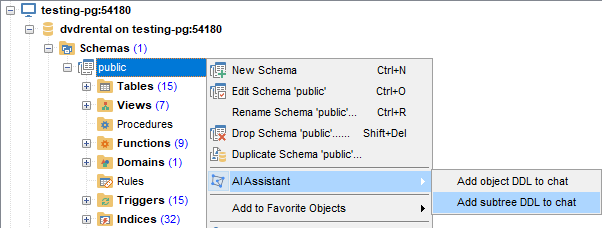
Add subtree DDL to chat — attaches the DDL of every object located below the selected node in the tree. The item is available for a database, the Schemas node, a schema and object nodes. What goes into the metadata snapshot is set on the Context tab: both the Object types and Details groups apply to a database, the Schemas node and a schema, while an object node uses Details only.
- The paperclip button in the input field attaches a text file. The maximum file size is set by the Attached file size limit, K tokens option.
- AI Assistant commands attach the context automatically: the SQL fragment when you explain, check, optimize or format a query; the error message and the statement that caused it when you fix an error; the plan when you assess an execution plan.
The menu items — Add to chat, Add object DDL to chat and Add subtree DDL to chat — and the paperclip button only attach data as chips; you write the request yourself. AI Assistant commands send the request straight away, with the attached context and a ready-made prompt template.