
Online Documentation for SQL Manager for PostgreSQL
Context
Use the Context tab to define what data is sent to the AI Assistant with your request, and how much. All the limits and thresholds on this tab are measured in tokens.
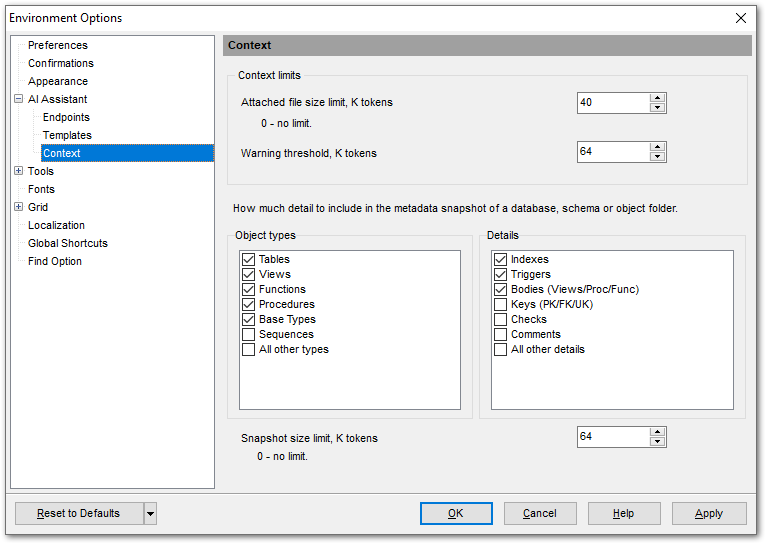
Context limits
The Attached file size limit, K tokens field sets the maximum size of a text file that can be attached to a request in the assistant panel. A value of 0 removes the limit.
The Warning threshold, K tokens field sets the value that the context size indicator in the assistant panel compares the accumulated conversation against. The indicator changes color as this value gets closer. Exceeding it does not prevent the request from being sent.
The rest of the tab defines how much detail goes into the metadata snapshot attached by the Add subtree DDL to chat item in the Database Explorer. Two groups of filters — Object types and Details — control what the snapshot includes. These settings do not apply to objects added with the Add object DDL to chat item: their DDL is always attached in full.
Object types
Select which object types go into the metadata snapshot:
- Tables;
- Views — including materialized ones;
- Functions;
- Procedures;
- Base Types — user-defined types, including domains, enumerations and composite types;
- Sequences;
- Other types — any object types not listed above.
Tables, Views, Functions, Procedures and Base Types are selected by default.
This group applies when the snapshot is collected for a database, the Schemas node or a schema. If you run Add subtree DDL to chat on an object node, the type is already defined by the node itself and this group is ignored.
Details
Select what goes into the description of each object:
- Indexes;
- Triggers;
- Bodies (Views/Proc/Func) — view definitions and the bodies of functions and procedures;
- Keys (PK/FK/UK) — primary, foreign and unique keys;
- Checks — CHECK constraints;
- Comments — object and column comments;
- Other details — anything not listed above.
Indexes, Triggers and Bodies (Views/Proc/Func) are selected by default.
Not every detail applies to every object type: indexes and keys, for instance, are only relevant for tables.
Hint: Leaving out the object types and details you do not need for the current task makes the context smaller and may help the model concentrate on what matters. Omit something the question depends on, however, and the answer will be less accurate — so match the snapshot to the task.
The Snapshot size limit, K tokens field sets the maximum size of a single metadata snapshot. A value of 0 removes the limit. If a snapshot exceeds this limit, the program warns you.
Note: This limit applies to a single metadata snapshot, not to the conversation as a whole. The size of the conversation is tracked by the indicator in the status bar, using the threshold set by the Warning threshold, K tokens field.
See Context and Adding context for details.
See also: