
Online Documentation for SQL Manager for PostgreSQL
AI Assistant
Use the AI Assistant tab to set the general options of the AI Assistant in SQL Manager for PostgreSQL.
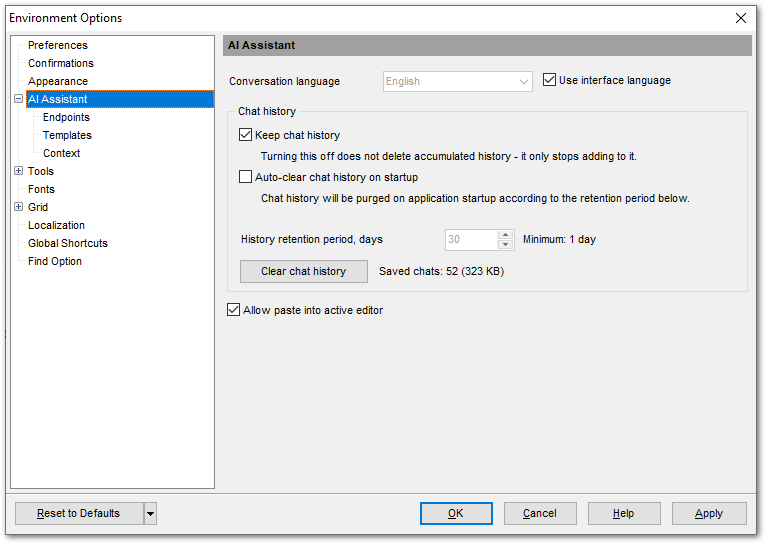
The Conversation language field defines the language of the assistant's replies. The  Use interface language option is selected by default, so the assistant replies in the current interface language. To use another language, clear the check box and select the language from the drop-down list. If the language you need is not there, type its name.
Chat history
Use this group to define how the chat history is stored and cleared.
Keep chat history (selected by default) — save all conversations with the assistant to disk so that you can go back to an earlier one and carry on. Clearing this check box does not delete the history already saved — it simply stops growing.
Auto-clear chat history on startup — every time the program starts, delete the chats that are older than the History retention period.
The History retention period field sets how long the chat history is kept, in days. The field is available only when the Auto-clear chat history on startup option is selected, and it applies only to that automatic cleanup. The minimum value is 1 day.
The Clear chat history button deletes the whole saved history immediately, regardless of the check boxes above and the retention period. You will be asked to confirm the deletion. The number of stored chats and the space they take up are shown to the right of the button. The chat you currently have open is not deleted.
Allow paste into active editor (selected by default) — lets you insert a code fragment from the assistant's reply into the active SQL editor window. When this check box is cleared, the Insert to active editor button is unavailable; you can still insert a fragment into a new Query Data tab.
|
Availability: |
|
|
Full version |
Yes |
|
Lite version |
No |
See also: