Online Documentation for SQL Manager for PostgreSQL
Creating/editing procedure
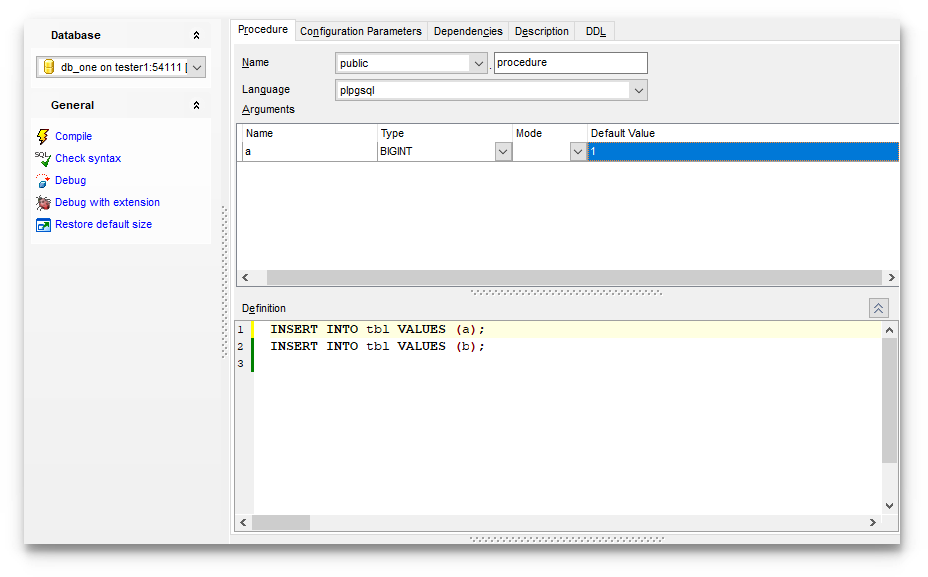
Use the Procedure tab of Procedure Editor to create/edit a procedure and specify its definition.
Name
Select a schema and enter a name for the new procedure, or modify the name of the procedure being edited.
Language
Select the language that the procedure is implemented in: SQL, C, internal, or the name of a user-defined procedural language.
The Arguments list provides the following attributes of each argument used in the function:
Name
Type (the argument data type)
Mode (in, out, in/out)
Default value
Set the procedure arguments by right-clicking in the list and selecting  Add Argument. Once the argument is added, select its type from the Argument Type drop-down list. To delete the existing argument, select
  Delete Argument from the popup menu. To reorder the arguments within the list, use the
  Move Up and
  Move Down items or the corresponding Ctrl+Up/Ctrl+Down shortcuts.
Definition
This area allows you to set the procedure definition (body).
For your convenience the syntax highlight, code folding, using macro and a number of other features for efficient SQL editing are implemented. For details see Working with Query Data area, Using the context menu.
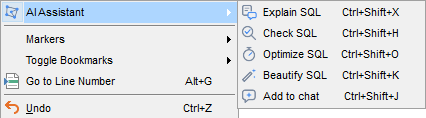
You can also work on the procedure definition with the help of the AI Assistant: the context menu of the editor provides the AI Assistant submenu, which lets you have the text explained, checked, optimized or formatted, or add it to the context of your next request.
To execute the function you can use the  Execute item available within the Navigation bar or toolbar.
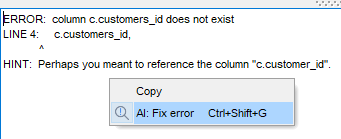
If an error occurs while the procedure is being executed or its syntax checked, the context menu of the message area at the bottom of the editor provides the AI: Fix error item: the AI Assistant receives the error text together with the statement that caused it and suggests a fix.