Online Documentation for SQL Manager for PostgreSQL
Object context menu
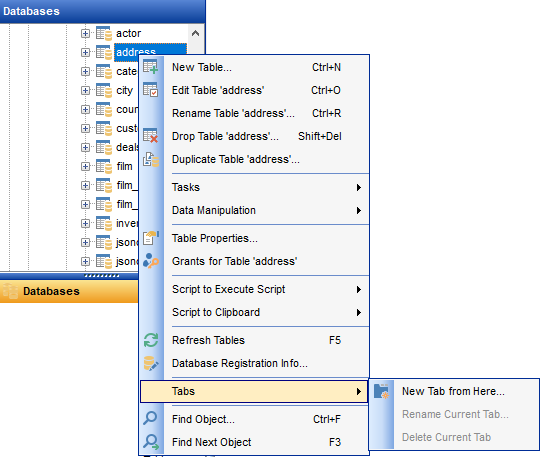
The context menu of an object (e.g. table or view) in the DB Explorer tree allows you to:
- create a new database object of the same type;
- edit the selected object in its editor;
- rename the selected object;
- drop the selected object from the database;
-
 duplicate the selected object (create a new object with the same DDL structure and properties as the selected object has);
- add the DDL of the selected object to the AI Assistant context;
- access common Tasks applied to this object;
- perform data manipulation operations (for tables and views);
- add the selected object to favorite objects;
-
access
 change management features;
-
view
 properties (for tables);
-
define
 grants for the selected object;
- generate the object script and open it in Query Data;
- generate the object script and copy its text to Windows clipboard;
-
 refresh all objects of the selected object type;
-
view/edit the database registration information within the
 Database Registration Info dialog.
-
 create a new tab for the selected object to access it through this tab quickly and/or manage the existing tab;
- search for database objects within the tree and continue searching, using the Search submenu;
- collapse all the nodes of the tree;
- expand all the nodes of the tree.
|
See also: |