
Online Documentation for SQL Manager for Oracle
Version history
|
Product name |
Version |
Release date |
|
SQL Manager for Oracle |
January 19, 2021 |
|
|
SQL Manager for Oracle |
June 6, 2019 |
|
|
SQL Manager for Oracle |
November 26, 2018 |
|
|
SQL Manager for Oracle |
July 27, 2017 |
|
|
SQL Manager for Oracle |
January 26, 2017 |
|
|
SQL Manager for Oracle |
June 9, 2015 |
|
|
SQL Manager for Oracle |
December 23, 2013 |
|
|
SQL Manager for Oracle |
July 15, 2013 |
|
|
SQL Manager for Oracle |
March 21, 2012 |
|
|
SQL Manager 2011 for Oracle |
July 4, 2011 |
|
|
SQL Manager 2010 for Oracle |
August 2, 2010 |
|
|
SQL Manager 2010 for Oracle |
January 28, 2010 |
|
|
SQL Manager 2008 for Oracle |
July 27, 2009 |
|
|
SQL Manager 2008 for Oracle |
December 17, 2008 |
|
|
SQL Manager 2008 for Oracle |
October 7, 2008 |
|
|
SQL Manager 2008 for Oracle |
August 25, 2008 |
|
|
SQL Manager 2007 for Oracle |
November 19, 2007 |
|
|
SQL Manager 2007 for Oracle |
August 17, 2007 |
|
|
SQL Manager 2007 for Oracle |
June 6, 2007 |
|
|
SQL Manager 2007 for Oracle |
March 26, 2007 |
|
|
SQL Manager 2007 for Oracle |
January 26, 2007 |
|
|
SQL Manager 2005 for Oracle |
December 5, 2006 |
1. Favorite objects info was not saved on Save settings wizard used. Fixed now.
2. Detailed info about Favorite objects was not displayed in SQL Assistant. Fixed now.
3. Visual schema was not reset on applying default program settings.
4. The RUSSIA value for NLS_LANG parameter was not supported at Check client. Fixed now.
5. Now you can register the database if no Home is available.
6. Object privileges were not displayed on the DDL tab for roles. Fixed now.
7. Query condition was corrupted on exporting query data. Fixed now.
8. Other improvements and fixes.
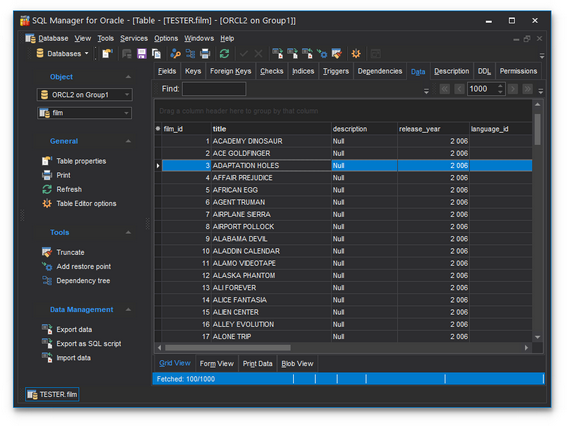
- The new look with updated icons.
- Support of dark visual scheme added.
- Added support for Amazon RDS for Oracle.
- Added support for the 18C Oracle server version.
- Improved support of high-DPI monitors and large-scale fonts.
- Support of Unicode added for object names.
- Objects can be now added to Favorites from the popup menu.
- Databases can be re-ordered in Database explorer now.
- Many other bug-fixes.
- Other improvements in interface and usability.
- Support for Oracle 18C added.
- Added statistics for redo logs switches.
- BLOB editor is automatically opened for BLOB data in binary fields.
- Query Data. Content of multiple tabs can be easily saved and restored from one file now.
- Added possibility for editing jobs by non-owners.
- Compare database wizard. Views are now created with FORCE option to aviod errors on synchronization.
- Compare database wizard. Fix of error on comparing materialized views.
- Compare database wizard. Target schemas were not loaded from the template. Fixed now.
- Package bodies created in lower case were incorrectly created with quotes. Fixed now.
- Data for invalid views was not displayed correctly. Fixed now.
- Many other fixes and improvements.
1. Data frame. Now you can add conditions to Quick Filter with Shift button.
2. "Reduced precision" option has been added for Materialized views.
3. Search of objects has been improved in Visual Database Designer.
4. Default parameters are processed correctly on executing procedures now.
5. "ORA-30757" error occurred on displaying XMLData values. Fixed now.
6. The error occurred when launching the program on OS with Breton locale. Fixed now.
7. Column autowidth was applied incorrectly in some cases. Fixed now.
8. Errors of editing partitions in Index editor have been fixed.
9. Delete rule was not applied for new objects in Foreign key editor. Fixed now.
10. It was not possible to set the "Follow trigger" option to none in Trigger editor. Fixed now.
11. Some errors in Scheduler Window editor have been fixed.
12. Some errors in Scheduler editor have been fixed.
13. Replace dialog. "Yes to all" button did not work properly if "Prompt on replace" option was enabled. Fixed now.
14. Many other improvements and bugfixes.
- Considerable improvement of performance in Execute Script, Extract Database, Compare Database and Dependency Tree tools.
- BLOB Editor. Support for viewing PDF data has been implemented.
- Ctrl+C can be used for copying text from error messages now.
- Out of memory error on extracting large amounts of data has been fixed.
- With UTF-8 connection national symbols were lost on executing DDL statement. Fixed now.
- Code Folding feature has been improved.
- Multiline /* */ comments were not highlighted correctly. Fixed now.
- The errors of processing reports have been fixed.
- Many other improvements and bug-fixes.
- The approach of working with data buffers has been changed. The memory is allocated now only for real data stored in the table, and not just relying on its definition. It has lead to a considerable economy of memory.
- The mechanism of user schema filtration has been improved. Now all the database editors, services and tools work only with the set of schemas indicated in the schema filter in the DB registration.
- Compare Databases. The mechanism of ordering of objects as per their dependencies has become better and faster. Now there is a possibility to compare only the schema objects, ignore objects of the schema PUBLIC, ignore objects’ parameters storage.
- Extract Databse. The mechanism of ordering of objects as per their dependencies has been refined and significantly improved.
- Duplicate Table. Now there is a possibility to choose sub-objects.
- Databases that are connected through SSH, are now marked with the special sign "lock-up".
- Now one can simultaneously execute several queries in Query Data, separated by ";" with browsing their data sets.
- The current schema in the objects tree is now marked with bold-faced type.
- Design Query parser work with the big number of ANSI joins has been fixed.
- Numerous errors related to group editing (deleting, relocation ..) in Visual Database Designer (VDBD) are fixed now.
- Export data of large data sets used to finish with the error "Out of memory". Fixed now.
- Running multiple instances of DB Comparer was finished with the error Out of Memory. Fixed now.
- Query Data. During the process of asynchronous execution of the long query with the specified timeout the query was interrupted and the data set was closed, even in the case when the query met the timeout limits. Fixed now.
- Many interface errors in case of editing the Storage Data for the table are fixed.
- Incorrect work with the ISO8859-5 DB encoding. Fixed now.
- Other improvements and bug fixes.
- Support of new Oracle 12c feature: Use of sequences in fields editor. Support of autoincrement fields.
- Support of new Oracle 12c feature: DEFAULT ON NULL option of column editors.
- Support of new Oracle 12c feature: Size of varсhar type fields is up to 32767 bytes.
- Support of new Oracle 12c feature: PL/SQL subprograms in WITH … SELECT queries.
- Support of new Oracle 12c feature: Partitioning mechanism is improved:
- Online move of partitions (without demounting database)
- Delete and remove several partitions at once
- Split and merge partitions
- Support of new Oracle 12c feature: Granting and revoking program module roles.
- Support of new Oracle 12c feature: Support of limits when uploading table and view data.
- Support of new Oracle 12c feature: Support of KEEP … SESSION option in sequences.
- Extract Database. Option "Delete existing records" is added.
- Role editor. Support of IDENTIFIED USING option.
- HTML Report. Operating procedure is significantly improved; HTML reports are created much faster now.
- When connecting through SSH, if SID and alias in tnsnames.ora were different, the connection error ORA-12514 occurred. Fixed now.
- When saving the diagram of Visual Database Designer as image, it was cut. Fixed now.
- Despite the restrictions set in "Schema Restriction" the whole range of schemas was requested from the server. Fixed now.
- When opening large tables the query interruption occurred with the 4 second time-out, despite the time-out settings. Fixed now.
- Lots of other improvements and bug-fixes.
- Debugger PL/SQL code. The mechanism is fundamentally changed; a lot of bugs is fixed. Visual Options are "remembered" now.
- Recompile invalid objects. The mechanism is fundamentally changed and improved. It is possible to determine invalid dependencies and to recompile both single problem objects and all dependencies as a whole.
- A new "Calculate dependencies" option appeared in Extract Database. It analyses dependencies and arranges them in accordance with the use.
- At any start/restart of the current connection when "Use separate connections for each data view within a database" option at Data options was on, AV error occurred. (e.g., Query Data, Execute Script, Register DB Options). Fixed now.
- When "Schema restriction" option for PUBLIC and Current at Operator Editor was on, AV error occurred. Fixed now.
- The DATE values were wrongly double-quoted importing from CSV. Fixed Now.
- If close several editors with the right-click menu of the windows bar (Close All) and open editor of other object, the close of unnecessary editors stopped. Fixed now.
- Data Manipulation | Export Data. "Failed: Out of Memory" error occurred when exporting table data with a great number of rows. Fixed now.
- DB Explorer. If the object was not deleted in DB Explorer, it was possible to open it in DB Explorer. Fixed now.
- If a table and a cluster with the same name were created, the cluster columns were added to the table columns when opening the table; if open the cluster, the table columns were added to the cluster columns. Fixed now.
- When "Sort by aliases" was on, the table fields were sorted in object tree. Fixed now.
- Lots of other improvements and bug-fixes.
- Added the Database Comparer tool which allows getting a script to synchronize the database structure.
- The Search in Metadata tool is implemented for performing the quick search within the scope of database metadata. The tool allows you to set various search conditions and view the results.
- Visual Database Designer.
- Added the 'Undo' and 'Redo' operations.
- Added tools for formatting diagram objects: setting fonts, colors, etc.
- HTML Report. Now it is possible to define the report visual style.
- Added the Database Registration Manager which allows adding and deleting database registrations quickly.
- Added the Instance Manager service which allows checking the service status of Oracle server and staring/stopping the service.
- Added the possibility to define shortcuts not only for Query Data commands, but for some other commands too (Environment Options | Global Shortcuts).
- SQL Formatter now allows formatting DDL statements.
- The switching between windows is now performed with the Ctrl + Tab shortcut.
- Added the possibility to duplicate objects in other databases by drag-and-dropping them in DB Explorer.
- Now it is possible to set the Connection string manually, while creating a database connection.
- Save and Restore layout. Now it is possible to save the column width while executing queries to Query Data and SQL Design Query.
- Added the possibility to set the font size only in DataGrid.
- Many other small improvements and bugfixes.
- Query Data and Execute Script.
- Added the possibility to set timeout for query execution.
- It was not possible to cancel a query using the “Asynchronous Query Execution” option. Query Data hanged up when performing large queries. Fixed now.
- Added the possibility to detect resource-intensive queries whose execution could take a long time (more than 10 seconds).
- Now if the Oracle Home list is empty (the client is not set), an alert message occurs.
- Now when setting a string type for the newly created table field, the size is set to 10 by default.
- Added the possibility to select the “multi-insert” option when exporting data as SQL-script (if this option is supported by the server).
- The changing of the "Object Type Body" source code caused the lost of the custom formatting. Fixed now.
- It was not possible to quote identifiers when using the “Convert created object names to upper case” option. Fixed now.
- If a field name started with a number, the error message occurred upon the data export. Fixed now.
- If none of the databases was registered upon using the "Edit local naming parameters" option, AV error occurred. Fixed now.
- When creating the "Flashback” restore point, the "Invalid identifier or cannot open address file" error occurred. Fixed now.
- When duplicating the table with the replacement of the layout scheme, the tablespace changed incorrectly. Fixed now.
- Design Query. When executing queries such as "Insert As Select, AV error occurred. Fixed now.
- Create procedures. After pressing the “Compile" button in the "Convert created object names to upper case"option, AV error occurred. Fixed now.
- It is now possible to execute queries, which contain string values with the “ ’ ” (apostrophe) symbols.
- It was not possible to insert rows with 1000 and more characters into the varchar (4000) field. Fixed now.
- When selecting the "Autoincrement" option to edit the previously created field, the autoincrement metadata was not created. Fixed now.
- When creating a key, the value inserted into the "Tablespace" filed was ignored. Fixed now.
- There were redundant records in the grid, when executing queries such as "select cast (fieldname as varchar (100)) from tablename". Fixed now.
- Objects located in the current tablespace were not displayed. Fixed now.
- Some other improvements and bugfixes.
- Added the new objects: Queue and Queue Table.
- Added the TKProf Wizard to work with TKProf program for handling trace files.
- Backup Database Wizard. The possibility to schedule the backup process is added.
- Design Query. If a file is opened, its name is displayed in the window title.
- Now SQL Manager does not execute “Alter session set …” queries under the Normal User as they used to result in the “ORA-01031: insufficient privileges” error.
- The speed of working with the object tree is increased. The work of the Normal User is optimized.
- Execute Script Editor. Added the support of the “/” delimiter for all objects.
- “Edit Local Naming Parameters” option is added to the main menu.
- Added the possibility to change the password for the Normal User.
- The work with two registered databases that had the same ServiceName caused to the “SQL command not properly ended” error if the Schema Restriction option was enabled. Fixed now.
- When importing data from the CHAR(1) field with the value of ' ' (a space), this field was imported as empty. Fixed now.
- Design Query. When pressing the Clear button, the query type was not reset to “Select”. Fixed now.
- Array Types Editor. The list of objects for quick switching was not filled. Fixed now.
- After refreshing and disconnecting from a database and closing SQL Manager, an error occurred. Fixed now.
- When moving to the Permissions tab under the Normal User, the ORA-00942 error occurred. Fixed now.
- Materialized Views.
- When creating a materialized view, an extra “;” was added to the DDL description and an error occurred. Fixed now.
- When deleting a materialized view whose editor was running, the DDL of the non-existent view was generated. Fixed now.
- When editing a function, the “There is an error in input of field…” message appeared. Fixed now.
- When trying to connect through SSH, the “ORA-01031: insufficient privileges” error occurred. Fixed now.
- When the “Hide empty schemes” option was enabled, the current user scheme was hidden if it did not contain any object. Fixed now.
- Tablespace Editor. If you did not go to the Files tab, data files were not displayed in DDL. Fixed now.
- Some other small improvements and bugfixes.
- New events for monitoring are added.
- It is now possible to view the description for each alert and the objects which the alert refers to.
- Oracle client checker.
- The algorithm of Oracle homes searching is changed (e.g. INSTANT_CLIENT and XE_CLIENTS are supported now).
- The errors are now displayed with the fixing instructions.
- Dependency Tree. The mechanism of the dependency tree building is improved; the building speed is increased.
- Added the possibility to enable/disable triggers in the object context menu in the DB Explorer.
- Register Database wizard. The new item is added to the “Connect Using” list which indicates that the connection will be performed through TNS_ADMIN.
- Environment Options.
- The “Quote low case identifiers” option is added.
- Added the “Autocreation options” option which automatically creates synonyms when creating a new object.
- Field Editor. Added the possibility to imitate an auto increment field by creating a corresponding trigger and a sequence.
- Recompile Invalid Objects. Synonyms are added to the list of available objects.
- The “Compile With Debug Info” task is added to the drop-down menu of PL/SQL objects.
- Scheduler Jobs/Scheduler Windows.
- After creating a new metaobject, its editor did not start. Fixed now.
- It was not possible to delete several metaobjects at once. Fixed now.
- Scheduler Programs. When the Enabled box was checked, the Disable script was generated and vice versa. Fixed now.
- After downloading a HTML report and upon refreshing any collection, the "Not enough available timer" message was displayed. Fixed now.
- Trigger Editor. It was not possible to set a fields list for which the trigger should fire. Fixed now.
- Export as SQL Script from Design Query. The ROWID column was included in the table DDL. Fixed now.
- Export as SQL Script from a view. Table and scheme names were quoted incorrectly. Fixed now.
- HTML Report wizard.
- Hyperlinks did not work if the object name included the “#” character. Fixed now.
- Indices were not indicated as unique in the corresponding column. Fixed now.
- Visual Database Designer. If a scheme was not implicitly indicated, a new table was created without columns. Fixed now.
- Fixed multiple errors occurred in the asynchronous query execution mode.
- When the parsing was disabled, execution of an empty script in the Execute Script tool caused an error. Fixed now.
- Key mappings for macroses did not work. Fixed now.
- Other small improvements and bugfixes.
- Added a number of new Oracle 10g objects: Scheduler Job Classes, Scheduler Jobs, Scheduler Window Groups, Scheduler Windows, Scheduler schedules, Scheduler programs, Scheduler chains
- Improved Execute Script performance: SQL statements parsing is enhanced
- Now table and view objects are not refreshed if the 'Refresh on connect' option is enabled
- Object editors' performance is enhanced, the dependencies are loaded faster when switching to the Dependencies tab
- DB Explorer: the program automatically hides SQL Assistant to increase performance
- Materialized View: it is now possible to create and edit partitions
- DB Explorer: it is now possible to drag-n-drop objects between different database groups
- Design Query, Select mode: the field created in the Selection section disappeared after saving and reloading a diagram. Fixed now
- Design Query, Update mode: the 'Delete Current Row' function deleted a row from the diagram only, not from the query text. Fixed now
- Design Query: after creating a query with a subquery at the Edit tab, the subsequent switching from the Edit tab to the Builder tab resulted in the 'ORA-00942: table or view does not exist' error. Fixed now
- Query Data: with the 'Asynchronous query execution' option enabled, query syntax errors were not displayed. Fixed now
- Query Data: when executing a query with the 'Asynchronous query execution' option disabled and then executing the same query with this option enabled, the Access Violation error occurred. Fixed now
- DB Explorer: the new tabs created in the DB Explorer were minimized after the program restart. Fixed now
- Even if the 'Login prompt before connection' option was enabled, the program stored the password in system registry. Fixed now
- Keyboard templates: inactive templates became active again after the program restart. Fixed now
- Create Database Wizard with the ability to create a standby database is added
- DDL: Unicode support is implemented
- Using macro is now possible in Query Data and Execute Script
- Added the possibility to connect to databases absent in TNS file
- Design Query: added the ANSI join option that allows users to create queries in ANSI-92 SQL standard
- DB Explorer: the Find Object dialog is improved
- DB Explorer: the possibility to reorder database groups by drag-and-drop is implemented
- DB Explorer: the button for switching the search mode is added to the toolbar
- DB Explorer: the program saves the information about the last opened database before shutdown. When it is started next time, this database will be automatically selected in the DB Explorer tree
- DB Explorer: double-clicking the object group folds or unfolds it
- Most of the options from the Grid | Data Options section of the Environment Options dialog can now be specified individually for each of the registered databases in the Database Registration Info dialog. The values specified in the Grid | Data Options section will be applied as default settings for newly registered databases
- Database Registration Info: metadata and Query Data logs can now be saved in UNICODE or ANSI
- Query Data: creation of queries with identical names was allowed. Fixed now
- Data Grid: the method of work in the asynchronous mode is changed – the usage of a separate connection for each data grid makes it possible to perform simultaneous fetching without losing the ability to use other functions of the program
- Data Grid: the mouse cursor color changes when the grid is not active
- Data View | Blob View: the XML tab allowing you to view BLOB field values as XML is added
- Extract Database / Export as SQL Script: now the script is directly generated in the selected charset which reduces the script generation time
- Visual Database Designer: tables are arranged more compactly in the reverse engineering mode
- Windows List: the 'Close All Database Windows' command is implemented
- Query Data: fixed several errors concerning SQL code highlight (alias usage in queries such as 'UPDATE : SET :', when using multiline comments, etc.)
- Query Data: when saving data to file using any charset different from Unicode, further opening the save dialog would set the charset to Unicode. Fixed now
- Query Data -> Explain query: the scrollbar was absent. Fixed now
- Extract Database/ Export as SQL Script: extracting external cursor data resulted in the ORA-00900 error. Fixed now
- Extract Database/ Export: the ORA-00900 error occurred when extracting queries with subquery block. Fixed now
- Visual Database Designer: alignment options did not work when a diagram was opened from the file. Fixed now
- Visual Database Designer: some printers could not print field and table icons. Fixed now
- Dependency Tree: pressing the Cancel button gave no result. Fixed now
- Other minor improvements and bug-fixes
- Added the Flashback wizard - a very powerful tool for restoring data to a certain state
- The possibility to search in metadata is implemented
- Debugger: a watch can now be removed by the Delete key
- Tablespace Editor: added the 'Flashback on' option which displays the flashback mode value
- Query Data: the code formatter is improved in order to better process huge and complex queries
- Visual Database Designer: the "Table is unavailable in database" error occurred on attempt to edit the table after the reverse engineering process. Fixed now
- Debugger: the Ctrl+Del shortcut caused the deletion of the current debugger tab. Fixed now
- ORA-54016 error occurred in 11G Oracle databases if the DESC and ASC compound index existed in a table. Fixed now
- If a field constraint and index had different names, an incorrect DDL was formed. Fixed now
- When editing PL/SQL Object’s body, the Compile action was not available. Fixed now
- If the Oracle Database client was not installed, the Local Naming Parameters editor activation resulted in the Access Violation error. Fixed now
- Extract Database: the data containing symbol " ' " were extracted improperly. Fixed now
- The "List index out of bounds" error occurred when editing huge and complex queries in Query Data. Fixed now
- Other minor improvements and bug-fixes
- Support of partitioning for tables and indexes including Oracle Database 11g new features: system and reference partitioning
- PL/SQL Profiler is a very powerful tool to help you profile existing PL/SQL applications and identify performance bottlenecks
- Database Alerts is a very powerful tool that performs a series of check alerts on a selected database and displays the results in real-time
- Support of many new features of Oracle 11g: compress tables, OLAP tables, read-only/read-write tables, invisible indexes, compound triggers, follows triggers, virtual columns, and others
- Support of Unicode data in Query Data, Design Query, Grid View, Export/Import Data Wizards
- All wizards, including Data Export/Import, DB Extract, Backup/Restore Database wizards, now run in the background mode, so that you could continue working with the program
- New improved Query Data of the Visual Studio 2005 kind with the Code Folding function, Unicode support, code completion, syntax highlight and other useful features
- Enhanced Import Data Wizard - now data can be imported up to 10 times faster; also added support of the following source file formats: HTML, XML Document, Open Document Format (ODF), Open XML Format (MS Word 2007, MS Excel 2007)
- Added the Permissions tab to object editors, making it possible to grant privileges on objects to users and roles
- Improved DB Explorer in several respects: added a menu for generation of common SQL statements for database objects (Script to Query Data, Script to Clipboard) - it is now possible to get CREATE, ALTER, DROP, SELECT statements for each database object; added the Search Panel
- Now it is possible to save frequently used queries within the Favorite Queries node of DB Explorer; Favorite Queries can be stored either locally in Windows Registry (in this case they are only available for local users), or in a special table of the database (therefore, the queries can be accessed by all database users)
- Improved Export Data Wizard: now works faster; added several output file formats: XML Document, Open Document Format (ODF), Open XML Format (MS Word 2007, MS Excel 2007)
- Added the Find Option tool which allows one to find the required option in the scope of all program settings, by a word or an expression from the option title
- Enhanced the reports management system
- Improved Visual Database Designer: added a new diagram object (Comment); possibility to select the specification level for displaying objects (only object names, only fields)
- Implemented PL/SQL Code Debugger in Query Data
- Added an ability to log the values of bind-variables in SQL Monitor
- Added Tips of the Day
- Statements of type MERGE INTO... USING ... were parsed incorrectly. Fixed now
- An Access Violation error occurred on attempt to Recompile invalid objects. Fixed now
- The application used to freeze upon adding an object to Visual Database Designer when a large number of objects were opened. Fixed now
- Other minor improvements and bug-fixes
- Added Polish localization
- Updated English localization
- Backup/Restore Database features are implemented; the User managed and RMAN user strategies are available
- Recompile Invalid Objects is also available for users who have no SELECT_CATALOG_ROLE privilege
- The Dependency Tree building speed has been significantly increased
- It was impossible to obtain data via a WITH-prefixed query. Fixed now
- Export as SQL Script: when extracting the CLOB field data as a string, the ' symbol was not processed correctly. Fixed now
- Key Mapping: the Quick Code settings used to be displayed incorrectly. Fixed now
- The Ctrl+Alt+Q key combination used to invoke the procedure list in the default scheme, which made it impossible to enter the @ symbol in the German layout. Fixed now
- A wrong script used to be generated when setting the 'Not Null' option in Table Editor. Fixed now
- When obtaining a sequence definition the current sequence value was not taken into account. Fixed now
- Database Registration Info: the Reconnection prompt used to popup even if no changes had been made. Fixed now
- Other minor improvements and bug-fixes
- Oracle Client Checker is added to check client and home settings at the program startup. It can also be called from the Database Registration Info dialog
- Advanced Statistics Wizard is added to collect, delete and import/export the statistics on specified objects for optimizer
- Truncate Wizard is added for truncating table and cluster data
- Enable/Disable Constraints Wizard is added to disable and enable the constraints of different types (for selected tables)
- Procedures and functions are shown as subobjects for the packages in DB Explorer, as well as in the Code Completion list
- The Recompile Invalid Objects service is added, which allows you to recompile selected invalid PL/SQL objects
- Code Completion: now the objects are displayed in the Code Completion list even if they were not refreshed in the object tree list of DB Explorer (can be switched off with the help of the corresponding option)
- Extract Database: wrong statements for creating materialized views used to be displayed in the target script. Fixed now
- When duplicating a table, the schema name of the target table was missing in field descriptions, which caused an error upon the script execution. Fixed now
- Visual Database Designer: when opening a previously saved diagram the 'Object not found in database' error used to occur. Fixed now
- Visual Database Designer: in some rare cases foreign keys were not displayed. Fixed now
- Database Registration Info: the value of the 'Rollback on Disconnect' option was not taken into account in case of emergency disconnect. Fixed now
- When deleting multiple materialized view logs in the object tree, a wrong script used to be generated. Fixed now
- Fixed the AV error which used to occur upon creating a view
- Dependency Tree: it was impossible to open the editor from a diagram for indices and triggers. Fixed now
- Execute Script: in some rare cases the script parser incorrectly detected object type for materialized views, object types, array types; those objects were placed into the wrong branch in DB Explorer. Fixed now
- DB Explorer: after disconnecting from a database the Recent Objects list remained active. Fixed now
- Other small improvements and bug-fixes
- Database Statistics form is added; it displays a summary of the instance performance, date of the last gathering statistics on tables and indexes. It also outputs the information on I/O sessions performance, CPU-time, memory, Hit-Ratios, Locks; the information on Tablespaces, Segments, SGA, Control Files, Data Files, Rollback Segments. Free space estimation is displayed graphically. Detailed information on wait events and latches is also available
- Database Information form is added; it contains common information on the current database instance and NLS parameters; allows viewing and editing its configuration parameters
- Object Tables support is implemented
- The ability to start gathering information for a separate table or schema is added
- The method of access level test to data dictionary (hierarchical privileges by roles, by system privileges) is fixed and expanded
- Print Metadata: a report on the table now includes field descriptions
- Visual Database Designer: the method of refreshing during reverse engineering is optimized. While performing reverse engineering, it is now possible to refresh the selected schemas only
- Creating and editing database reports is now available for users with limited access privileges
- DB Explorer: added the ability to rename database groups
- Query Data: the SELECT queries containing the DISTINCT keyword used to work incorrectly. Fixed now
- Reports could not be renamed. Fixed now
- When extracting a database by a user with limited access to the data dictionary, an error used to occur. Fixed now
- When opening invalid objects within the 'floating windows' environment the 'Can't focus a disabled or invisible window' error used to occur. Fixed now
- Local Naming Parameters Editor: some errors in the editor work are fixed
- The bug concerning incorrect displaying dependencies for materialized view log is fixed now
- Other small improvements and bug-fixes
- Full support of External and Index-Organized tables
- Invalid status objects are marked with a cross in the DB Explorer tree now. Users are considered invalid if any of EXPIRED, LOCKED, EXPIRED GRACE, EXPIRED TIMED account statuses takes place
- Execute Script: ability to execute selected statements and statement under cursor added
- Execute Script: DBMS output is displayed now
- Execute Script: script is not loaded into memory anymore when executing a script from file
- Query Data: DBMS output is displayed now
- Query Data: when switching between queries, the cursor and scrolling bar positions were not saved. Fixed now
- XMLType is added to the list of available fields
- Changing Metadata window: if an error occurs, the cursor is now moved to the place which caused an error
- When refreshing tablespaces on Oracle 9.2, an error used to occur. Fixed now
- If table or view lists were not refreshed in DB Explorer, the first attempt to execute a query in Query Data could take a long time, especially if connection was slow or the server was overloaded. Fixed now
- In some rare cases on opening the Code Completion window and typing symbols the window started to blink. Fixed now
- In some cases, when closing a report, the Access Violation errors used to occur. Fixed now
- Some objects could be refreshed by a user with no SELECT_CATALOG_ROLE privilege. Fixed now
- Visual Database Designer: when deleting foreign keys, the confirmation dialog did not appear. Fixed now
- Database Registration: the database list always displayed databases from the default home directory, irrespective of the selected home. Fixed now
- When creating a tablespace on Oracle 8 or Oracle 9 the Minimum Extent Size parameter was ignored in some cases. Fixed now
- Other small improvements and bug-fixes
Basic features:
- Rapid database management and navigation
- Easy management of all Oracle objects (including create/edit/drop operations)
- Advanced data management and manipulation tools
- Impressive data export and import capabilities
- Effective security management
- Excellent visual and text tools for query building
- Report designer with clear in use report construction wizard
- Powerful Visual Database Designer
- Latest Oracle version support
- New state-of-the-art graphical user interface
and more...
|
See also: |


































































