

Online Documentation for SQL Manager for PostgreSQL
Options for storing object definitions
This dialog allows you to select which object types to save and to set templates for file names.
Definitions for object types that are not selected will not be saved.
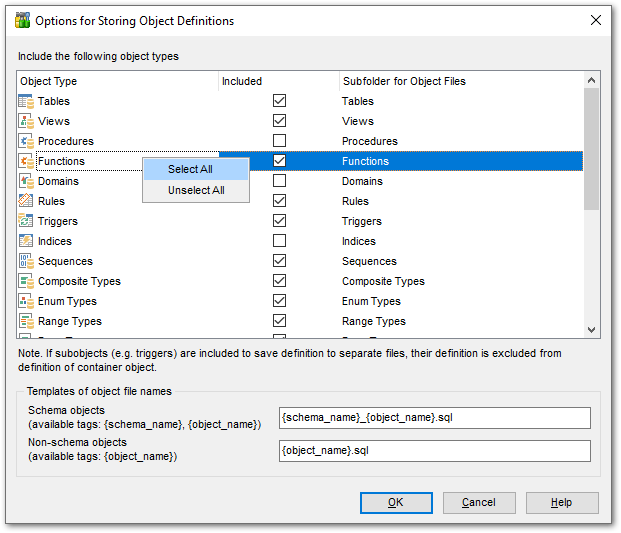
Include the following object types
This grid contains the list of object types present in a database. To select an object type, check the corresponding checkbox in the Included column. For your convenience, the Select All and Unselect All functions are available in the context menu of the list area.
Note: If subobjects (e.g. triggers) are included to save their definitions to separate files, their definitions are excluded from the container object's definition.
When you create or edit an object of a selected type, its definition is written to its corresponding *.sql file. Existing objects of the selected types can be specified in the Object file names dialog.
The directory for storing objects of the same type is defined in the Subfolder for Object Files column. By default, all folders have the same names as the corresponding object types.
Note: If you do not provide the full path to the folder, it is stored in the directory specified in the Root folder for storing object definitions field. To select another location, use the  button. This button appears when you click the corresponding cell.
Templates of object file names
Use this group of options to define templates for file names used to store object definitions.
For your convenience, tags are provided. You can use the {object_name} tag in templates for both schema and non-schema objects. For schema objects, the {schema_name} tag is also available.
The file extension is optional.