

Online Documentation for SQL Manager for PostgreSQL
Object file names
This dialog allows you to manage objects to be written to files and their corresponding file names.
The order of object definitions in the general script created when you click the Generate Script... button matches the order of objects in this list.
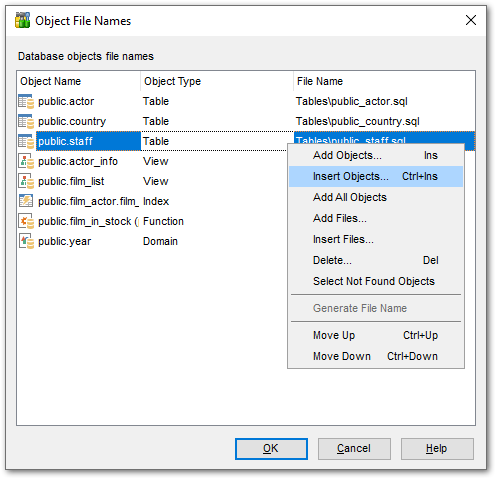
If a database object is not added to this list, its definition is not saved to a file. To manage this list, use the grid context menu.
To add all existing database objects of selected types, use the Add All Objects context menu item.
To add specific objects, use the Add Objects... or Insert Objects... context menu item. Select the desired object(s) in the Select Object dialog that opens.
File names are generated automatically based on templates defined in the Options for storing object definitions dialog. You can change the file name and its path if needed by pressing the  button. For your convenience, the Generate File Name option is available. If the File Name field is empty for any reason, you can use this option to set the default file name based on corresponding templates.
You can add any *.sql files that are not associated with object definitions to this list. For example, you can add a file containing a script for populating a table with data. Use the Add Files... or Insert Files... commands for this purpose. After the file is added to the list, select SQL as its Object Type and define the Object Name.
To remove files from the list, use the Delete... context menu item. Multiple select is supported.
Use the Select Not Found Objects context menu item to reveal objects that are present in the list but do not exist in the database.
Use the Move up and Move down context menu items to reorder the objects.