
Online Documentation for SQL Manager for PostgreSQL
Filtering
Quick Filtering (by the current value in a cell)
Open the context menu of the needed column and choose the Quick Filter item. Then choose a filter condition in the opened submenu.
Filtering by Column
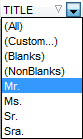
Open the drop-down list on the column title and choose a filter condition from the list.
You can set advanced conditions by using the Custom... menu item.
When choosing this item, the special window for setting filter conditions opens.
Advanced Filtering
You can set advanced filter options by pressing the button  on the toolbar of the Data View and set filter parameters in the Filter Builder. Apply the set conditions by pressing the Apply button.
If a filter is set for a table, the special bar appears in the lower part of the table where you can see filter conditions and the history of filter changes opened by pressing the drop-down list.
This bar allows you to:
-
disable filter by pressing the button
 ,
,
- enable filter by checking the box with the necessary condition,
- change filter conditions by using the Customize... button. This button opens the Filter Builder.

Disable Filtering
To cancel filtering, open the context menu of the column and choose the Disable filter item.
Or press the button on the filter toolbar.


































































