
Online Documentation for SQL Manager for InterBase/Firebird
Configuring Database Explorer
Configuring DB Explorer toolbar
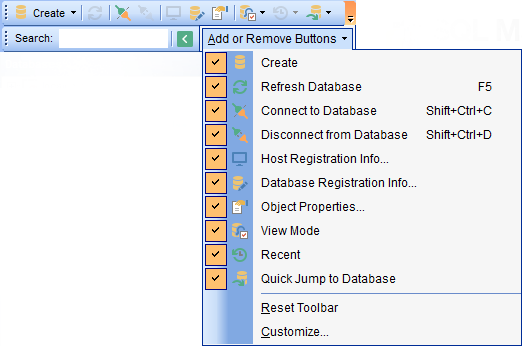
The toolbar of Database Explorer contains most frequently used tools for working with databases and database objects, and a tool for configuring DB Explorer. The following actions are available in the toolbar by default:
- create a new object;
- refresh the current tree branch;
- connect to a database;
- disconnect from a database;
- view the selected object properties;
- configure Database Explorer using the View Mode menu;
- view the list of recently opened objects;
- jump to any of registered databases quickly.
Click More buttons...  on the right side of the toolbar and use the Add or Remove Buttons popup menu items to define the set of actions available in the toolbar. To customize the toolbar, select the Add or Remove Buttons | Customize... item from the popup menu.
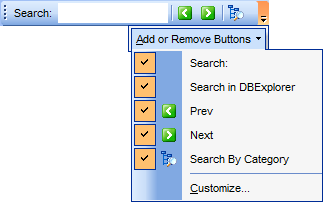
Click More buttons... on the right side of the Search Panel and use the Add or Remove Buttons popup menu items to define the set of the panel elements. To customize the panel, select the Add or Remove Buttons | Customize... item from the popup menu.
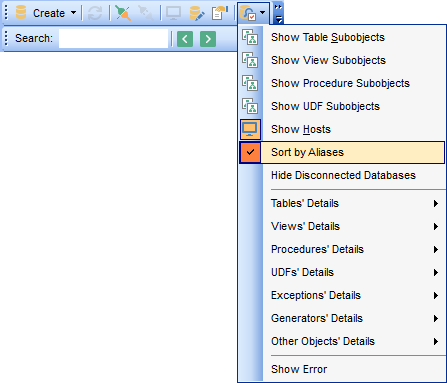
Use the View Mode  toolbar button to configure Database Explorer according to your needs.
The drop-down menu called upon clicking this button allows you to:
- show/hide table subobjects as child nodes of tables;
- show/hide view subobjects as child nodes of views;
- show/hide procedure subobjects as child nodes of procedures;
- show/hide UDF subobjects as child nodes of UDFs;
- show/hide host nodes for registered databases;
- sort the list of databases by their aliases in the DB Explorer tree;
- show/hide disconnected databases;
- configure table/view/procedure/UDF/exception/generator/other objects' details for the SQL Assistant area;
- show/hide error.
Use the DB Explorer section of the Environment Options dialog (Options | Environment Options...) to see more options to configure Database Explorer.


































































