Online Documentation for SQL Manager for InterBase/Firebird
Operations with database objects
Database Explorer allows you to perform various operations with database objects.
To open an object in its editor, you can double-click the object in the DB Explorer tree.
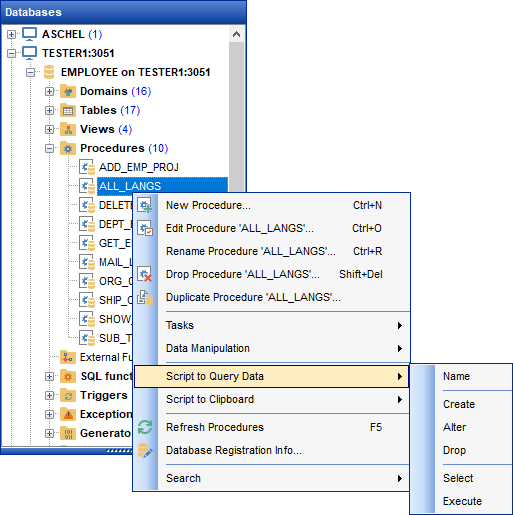
You can also right-click an object within the DB Explorer tree and use its context menu to perform a number of operations:
- create a new object (the New <object>... item);
- edit currently selected object (the Edit <object_name>... item);
- rename currently selected object (the Rename <object_name>... item);
- drop the selected object from the database (the Drop <object_name>... item);
- duplicate the selected object (the Duplicate <object_name>... item);
- define grants for the selected object (the Grants for <object_name>... item).
Note that the context menu contains object-specific items only when the object is currently selected in DB Explorer.
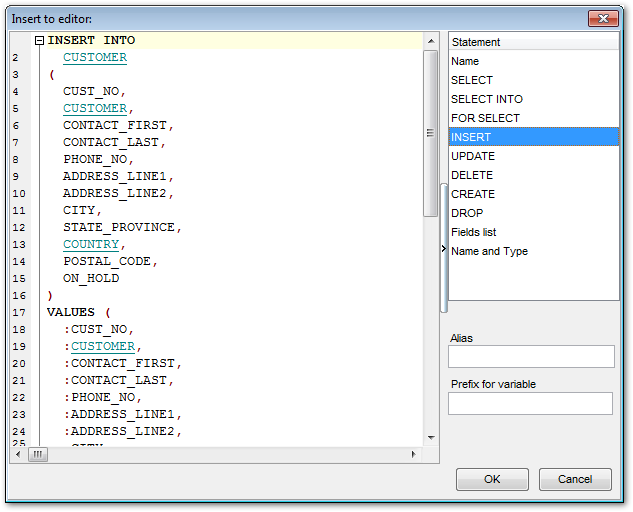
Using drag-and-drop operations you can add objects to Query Data editor, Query Designer or Execute Script Editor. For your convenience the Insert to editor dialog is implemented. The dialog allows you to specify the statement to be inserted into the editor: Name, SELECT, INSERT, UPDATE, DELETE, CREATE, ALTER, DROP, Fields list, Name and Type. If necessary, set the Alias and Prefix for variable.
If more convenient, you can edit the generated statement manually (see Working with query).