


EMS SQL Manager for InterBase/Firebird — develop, debug and look after InterBase and Firebird databases
Step through stored procedures and triggers, find the transaction that keeps garbage from being collected, back up with gbak or nbackup, validate a damaged database and hand out privileges — without memorizing command-line switches. One application works with Firebird up to 5.0, InterBase up to 15, and Firebird Embedded.
New in version 7.0: an AI Assistant that reads your PSQL, execution plans and error messages, and works with the model you choose — a cloud provider or one running on your own network.
InterBase and Firebird: Two Servers, One Tool
InterBase and Firebird share a history, but not a feature list. SQL Manager supports what is specific to each of them, so you do not need a second tool when you move between the two.
| Capability | InterBase | Firebird |
|---|---|---|
| Procedures, triggers, generators, exceptions, domains, UDFs, BLOB filters | ✓ | ✓ |
| Database triggers on connect, disconnect and transaction events | — | 2.1+ |
| DDL triggers | — | 3.0+ |
| Packages and identity columns | — | 3.0+ |
| ICU collations: case- and accent-insensitive, numeric sort order | — | ✓ |
| Incremental backup | online dump, 2009+ | nbackup, multi-level, 2.0+ |
| Journaling and restore to a point in time | 2009+ Server Edition | — |
| Users stored inside the database (Embedded User Authentication) | 7.5+ | — |
| Connecting to encrypted databases (System Encryption Password) | ✓ | — |
| Windows trusted authentication | — | 2.1+ |
| Embedded server | — | ✓ |
| Real-time monitoring of attachments, statements and transactions | 7+ | 2.1+ |
Before the first connection, Get Server Preferences detects the server version, the security database, a matching client library (gds32.dll or fbclient.dll) and the authentication type.
Transactions, Sweep and Attachments Under Control
In InterBase and Firebird, a single transaction left open for hours can stop garbage collection, make the database grow and slow down every query that touches the affected tables. SQL Manager shows you the numbers that reveal it — and lets you act on them.
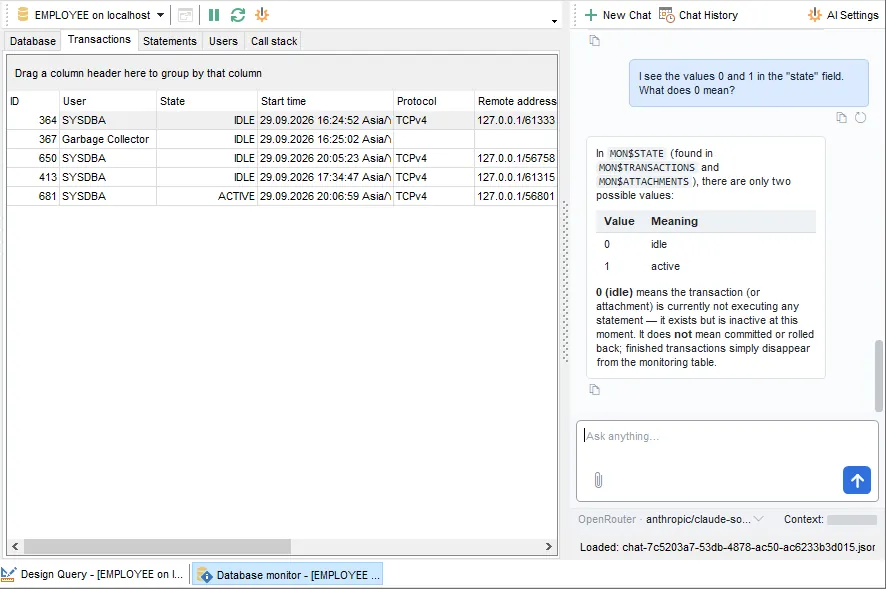
Transaction counters on one screen. Database Monitor shows the next transaction next to the oldest interesting, oldest active and oldest snapshot ones, along with commits, rollbacks, deadlocks, conflicts and sweep status. A widening gap between the next and the oldest active transaction points straight at the problem.
Who is attached and what they are running. See every attachment with its user, role, remote address, process ID and number of active transactions, and every statement being executed right now. From the same window, commit or roll back a transaction, cancel a statement or disconnect a user.
Transactions in limbo. Transactions left unresolved by a failed two-phase commit show up in the monitor; database validation can list them, and a backup can be told to skip them.
Server-specific detail. On Firebird, follow the PSQL call stack of a running request down to the source line and column. On InterBase, see which procedures, triggers and tables are in use, with page and record counters, and a chart of the memory pools.
Settings that affect garbage and durability. Change the sweep interval, forced writes, page buffers, linger interval and read-only mode in Database Properties; on InterBase, also group commit and reclaim interval.
Warnings before a limit bites. InterBase and Firebird allow a table's structure to be changed only 255 times before a backup and restore is needed. Table Altering Monitor shows how many changes each table and view has used up.
Event alerters. Register the events your procedures and triggers raise with POST_EVENT, and watch them arrive in Event Monitor with a counter for each.
Debug PSQL Step by Step
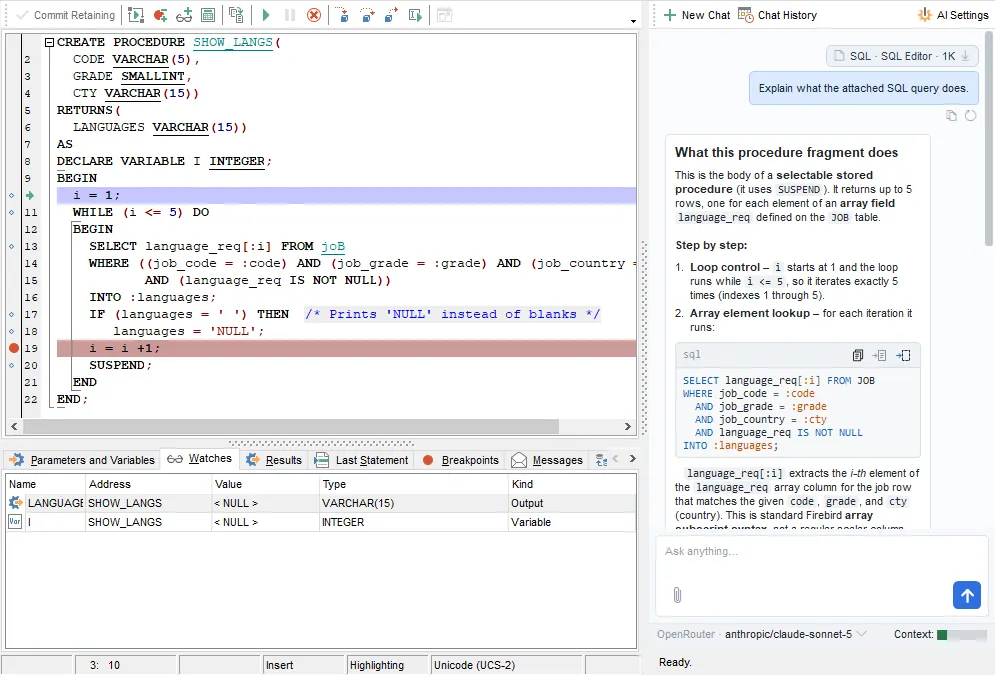
PSQL has no console to print to, so without a debugger, finding a bug in a procedure often means writing intermediate values to a logging table. SQL Manager lets you stop inside the code and look
Breakpoints that do more than stop. Give a breakpoint a condition, a pass count, or an expression to evaluate each time execution passes through it.
See and change values. Parameters and variables are listed with their current values; hover over a name in the code for a quick look, add watches, or set a new value — including NULL — to force another branch.
Follow the call chain. Trace into nested procedure calls, read the call stack with the arguments of each call, see the last executed statement with its plan and execution time, and the rows a selectable procedure has returned so far.
Not only procedures. Debug triggers, database triggers and SQL functions the same way.
Know what a routine touches. The Operations tab lists every SELECT, INSERT, UPDATE and DELETE statement inside a procedure or trigger; Ctrl+click an object name in the code to open it in its editor.
An AI Assistant for PSQL, Plans and Errors
The assistant is a chat panel docked beside your editors. It does not come with a model of its own: register Anthropic, OpenRouter or any OpenAI-compatible service, or point it at Ollama, LM Studio or vLLM running on your network.
Right-click in any code editor. In the query and script editors and in the editors of views, procedures, SQL functions, triggers and database triggers, ask it to explain, check, optimize or reformat the code.
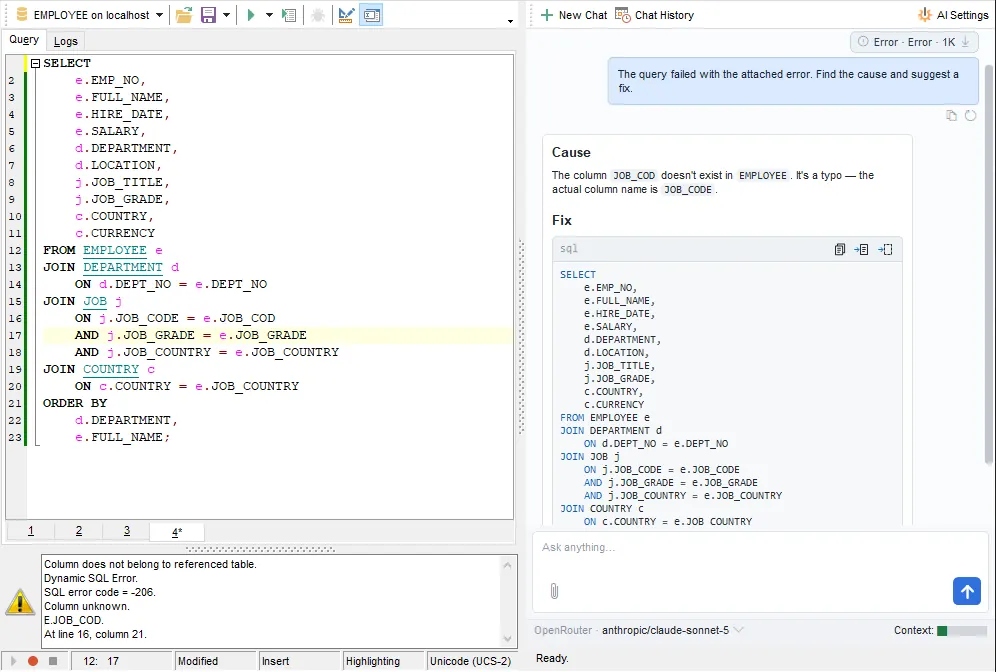
When compilation fails. The error from the server and the statement that caused it go to the assistant together — from the Compile window, the query editor or the script editor — and you get a proposed fix.
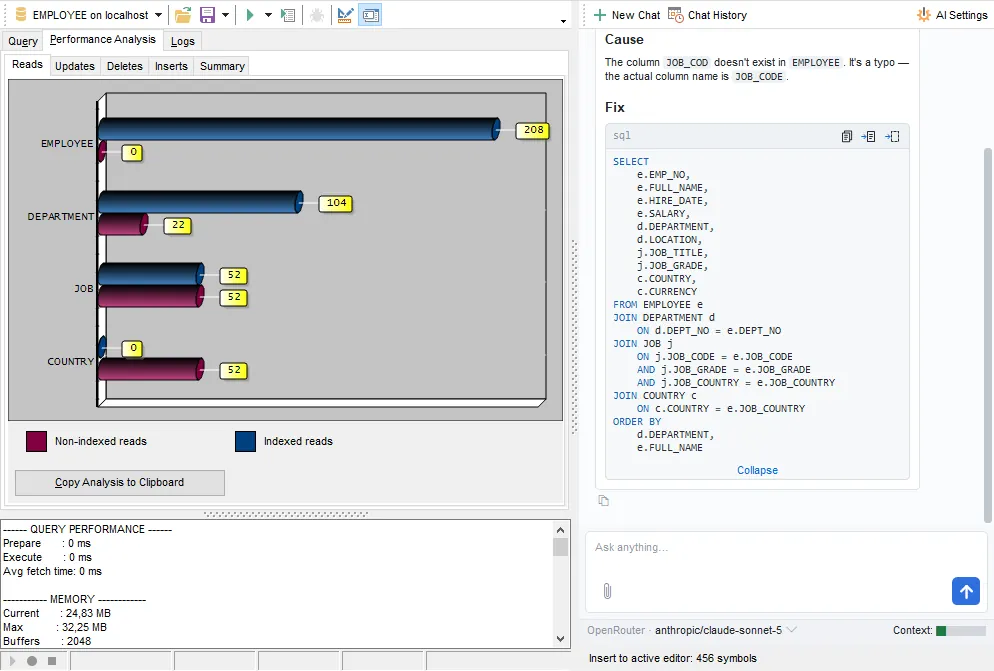
A second opinion on the plan. Send the PLAN of a query for a list of bottlenecks and recommendations.
Schema, not data. Add the DDL of an object or a whole branch of the DB Explorer tree to the request. The size of everything attached is shown in tokens before you send, and table rows never leave your machine.
Changes compared before they land. A suggestion that replaces code in the editor opens next to the current text, with the differences highlighted, and is applied only when you accept it.
Why a Query Is Slow: Plans, Index Reads and Selectivity
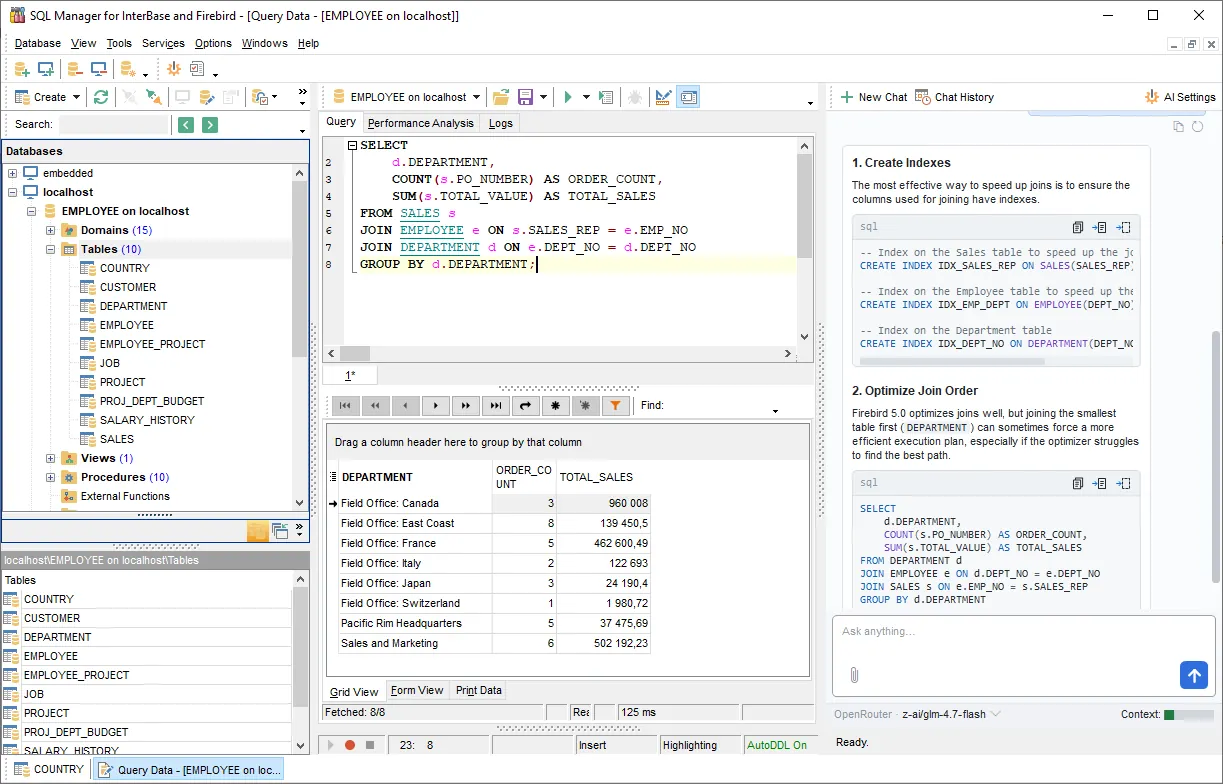
The plan as a tree. The Plan tab shows how the server executes a query — the operations, tables, aliases and fields involved. Have it open automatically after each execution, export it, or send it to the AI Assistant. Views have their own Plan tab.
Indexed and non-indexed reads per table. Performance Analysis charts, for each table in the query, how many records were read through an index and how many by a full scan, along with inserts, updates, deletes, execution time and memory. A table with thousands of non-indexed reads is where an index is missing or not being used.
Keep index selectivity up to date. The optimizer chooses plans using index selectivity, and after bulk loads or deletes it goes stale. Recompute it with SET STATISTICS for selected or all indexes, system indexes included, or rebuild indexes by deactivating and reactivating them.
Database statistics without gstat. Collect header page, index, table and system table statistics from a wizard and save the report to a file.
Big tables stay responsive. Fetch only the visible rows, and sort and filter on the server instead of in the grid.
Backup, Restore and Repair
Every backup method of both servers is available from one wizard — through the server's Services API or local utilities, with the backup file stored on the server or on your computer.
| Backup type | Server | How it works | Restore options |
|---|---|---|---|
| Full backup (gbak) | InterBase, Firebird | Logical copy of metadata and data; transportable between platforms | Into a new or existing database; change the page size (up to 16 KB) and fill ratio; restore with indexes deactivated |
| Multi-level incremental backup (nbackup) | Firebird 2.0+ | Physical copy of changed pages; levels 0, 1, 2… | Pick a continuous chain of levels from the backup history |
| Online dump | InterBase 2009+ | Physical dump taken while users keep working; can be refreshed with changes only | Into the original or a new database file |
| Journal archive | InterBase 2009+ | Database dump plus journal files | Restore the database as of a chosen date and time |
- Backup files named by date. Add [Timestamp], [Date] or [Time] to the file name, compress the backup, and save the wizard's settings as a template to repeat the job in a few clicks.
- gbak options for the hard cases. Back up metadata only, ignore bad checksums or transactions in limbo when rescuing a damaged database, and decide whether garbage is collected during backup.
- Validate and repair. Run a read-only check, or repair structures and record fragments, prepare a corrupt database for backup, drop unavailable shadow files and sweep old record versions — with the log written to a file.
- Shut down and bring online. Take a database offline in forced, deny-new-transactions or deny-new-attachments mode with a timeout, and bring it back online. The backup, restore, validation, statistics and index wizards can do this for you before and after the job.
- Purge large tables safely. Delete table data with triggers deactivated for the duration, foreign key delete rules changed temporarily, and index statistics recomputed and the database swept afterwards.
Users, Roles and Privileges
- Server users. Add, edit and remove the users of the server's security database in User Manager.
- Users inside the database. On InterBase 7.5 and later, manage Embedded User Authentication accounts with a default role, an active flag and a database-owner flag.
- Roles and their members in Role Manager.
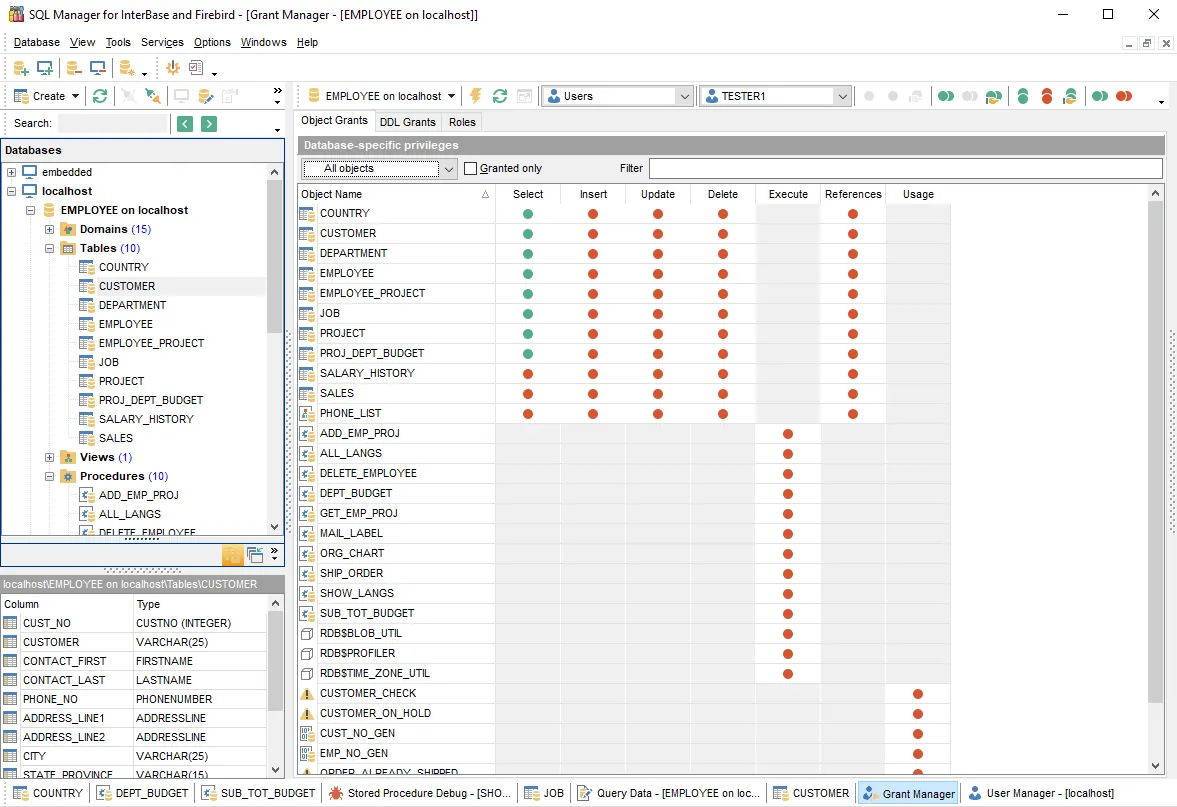
- Grant Manager. Grant privileges not only to users and roles but also to views, triggers and procedures: SELECT, INSERT, UPDATE, DELETE and REFERENCES on tables and views, down to individual columns; EXECUTE on procedures; USAGE on generators and exceptions; CREATE, ALTER and DROP for whole object types. Filter the list to show only objects with privileges granted.
- Secure connections. Reach the server through an SSH tunnel or over SSL with a client certificate; on Firebird 2.1 and later, sign in with Windows authentication.
Queries, Data and Scripts
- Query editor. Several queries in tabs, code completion, object links, parameters with a history of values used, a log of executed queries with fetch time, favorite queries stored in the database or on your computer, and commit or rollback at your command.
- Visual query builder with joins, UNION, subqueries, CASE expressions and HAVING conditions — for SELECT, INSERT, UPDATE and DELETE statements.
- Scripts of any size. Run a script straight from a file without opening it, jump through its statements with Script Explorer, and turn off parsing to speed up execution.
- Master-detail in one grid. Open related tables as nested grid levels built from foreign keys, switch to card view, add column summaries, and edit BLOBs as text, rich text, images, HTML or hex.
- Import and export. Excel, Access, Word, RTF, HTML, PDF, CSV, TXT, XML, DBF and ODF files, with reusable templates; import modes from insert-all to update-or-insert.
- Move data to another server. Export a table's data as an SQL script for DB2, SQL Server, MySQL, Oracle or PostgreSQL, with a CREATE TABLE statement if needed.
In-purchase Benefits
- FREE One Year of Maintenance already included!
- FREE software updates and upgrades during Maintenance period!
- FREE and unlimited Technical Support during Maintenance period!
- Reasonable pricing for Maintenance renewal – from 35% per Year!
- Volume discounts when buying two or more copies of one product
- Cross-selling discounts on related products
- 30-day money-back guarantee
Pricing & Licenses
Subscription — recurring monthly or annual payments. Updates and technical support are included while your subscription is active.
Business Licenses
Individuals & Non-profits
Perpetual license — buy once and keep the software forever. Each option below includes 1–3 years of maintenance (updates + support). Pick the term that suits you and renew anytime.
Business Licenses
Individuals & Non-profits
SQL Manager for InterBase/Firebird
Get started with SQL Manager for InterBase/Firebird
Download a fully-functional 14-day free trial, and start saving time with your database management today.
Download free trialGot questions?
If you'd like any help, or have a question about our tools or purchasing options, just get in touch.
SQL Manager is part of the SQL Management Studio
Perform even more tasks on the development, administration, and maintenance of your database, saving up to 55%!
Learn more
Related Products


