EMS SQL Manager for PostgreSQL — the AI-powered GUI for building, tuning and running your databases
Write and debug SQL and PL/pgSQL, find out why a query is slow, and manage every object from partitioned tables to row-level security policies. Keep the server healthy with backups, maintenance and monitoring. Works with any PostgreSQL version from 7.3 to 18.
The built-in AI Assistant explains, reviews and optimizes SQL right in the editor. Use your own API key or run a local model, so your data never leaves your network.
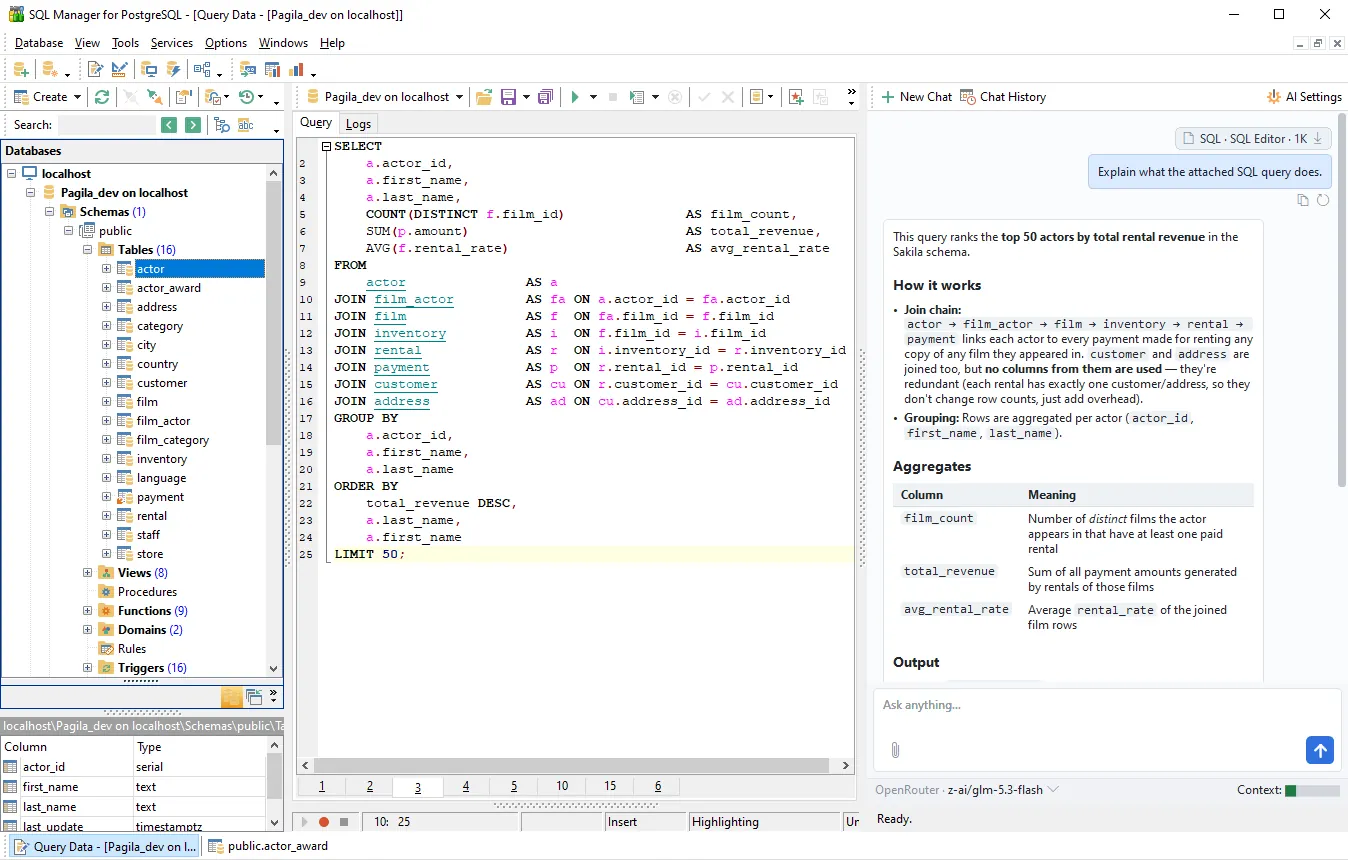
AI Assistant for Writing, Explaining and Fixing PostgreSQL Queries
Describe what you need in plain words and get a ready-made query, ask for an explanation of someone else's SQL, fix a failed statement straight from the error message, or speed up a slow one — without leaving the window you work in.
- Works right where you write your queries. Assistant commands are available in the SQL editor and in the editors for views, procedures, functions and triggers, in the execution plan viewer, and in the database object tree.
- You see what goes to the model. Every piece of context is shown as a separate chip before sending, with a token counter alongside — remove anything you don't need.
- Your provider, your keys. Anthropic, OpenRouter and any OpenAI-compatible service — or a local model that runs entirely inside your network.
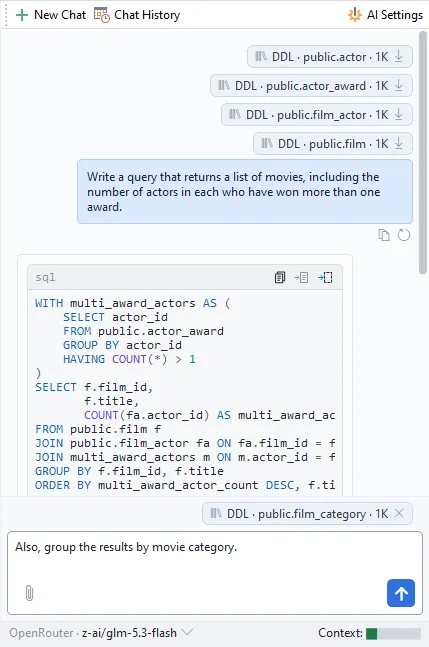
Find and fix slow PostgreSQL queries
When a database slows down, the cause is usually a handful of queries. SQL Manager shows where the time goes, from a single execution plan to the workload of the whole server, so you can move from "it's slow" to a concrete fix.
- Execution plans you can actually read. Run EXPLAIN or EXPLAIN ANALYZE and get the plan as an operation tree that shows, for every node, startup and total cost, estimated vs. actual rows, loops and time. Misestimates and unexpected sequential scans stand out at a glance. Export the plan to compare it with the new one after changes, or send it to the AI Assistant with Assess plan to get a list of bottlenecks and suggested fixes.
- Server log grouped by query template. The Server Log SQL Parser turns PostgreSQL logs into a sortable grid with PID, duration, statement, errors and warnings. Statements are grouped by template, so a query that runs thousands of times with different parameters shows up as one line. Sort by total duration, find the worst offender and open it in the SQL editor in one click.
- Table, index and column statistics. See sequential vs. index scans, rows read and fetched, cache hit ratio and the most frequently changed tables, as a grid or a chart. Sort indexes by scan count to spot the ones that are never used. Column statistics show exactly what the planner sees: null fraction, number of distinct values, correlation, most common values and histogram bounds. When estimates drift from reality, run ANALYZE on selected tables right from the statistics window and check the plan again.
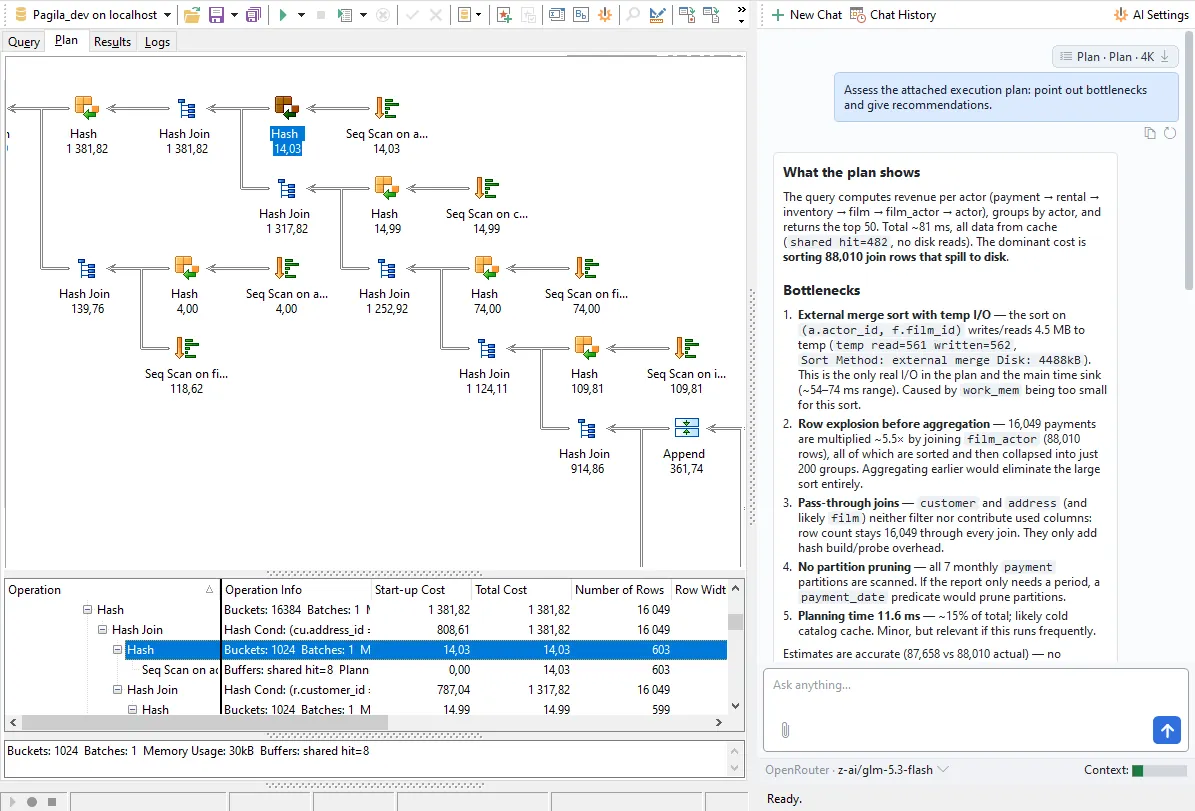
Powerful PostgreSQL Query Development Tools
Everything you need for everyday SQL work, from the first draft of a query to a script with thousands of statements.
- Work in an editor built for daily use. Code completion, folding and formatting come as standard. Keep several queries open as tabs in one window, run parameterized queries, and go back to anything you've executed through the query log. Save favorite queries and reuse them across databases.
- Build queries visually. Drag tables onto a diagram, link columns to create joins, then set criteria, grouping and sorting in a grid. SQL Manager writes the SQL as you go, and you can edit it by hand at any time.
- Generate statements from the object tree. Right-click a table to get a ready-to-run SELECT, INSERT, UPDATE or DELETE statement in a new query tab.
- Run scripts of any size. The script editor executes multi-statement files. Scripts too large to open in the editor run straight from disk, without being loaded into memory.
- Find anything in the schema. Search in Metadata looks through the definitions of all database objects, so you can find every function that references a column before you rename it.
Develop and debug PL/pgSQL
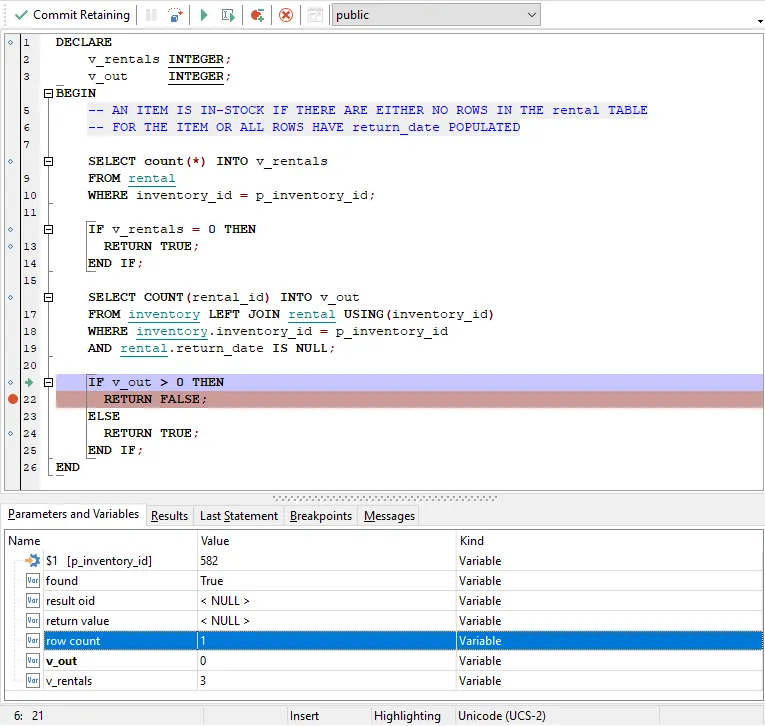
Stored functions, procedures and triggers are where the hardest bugs live. SQL Manager lets you step through them instead of guessing with RAISE NOTICE.
- Step through code line by line. Set breakpoints, step over statements, run to the cursor and watch parameters and variables change as the code runs. Hover over a variable to see its value, or change it on the fly to test another branch.
- Start debugging with no server setup. The built-in debugger works out of the box. To step into nested function calls as well, enable the
pldbgapiextension right from the Extensions manager. - Navigate code like an IDE. Ctrl+click any function or table name inside a function body to open it in its own editor. Errors are shown together with the statement that caused them, and Fix error sends both to the AI Assistant.
- See what depends on what. The Dependency Tree shows every object that depends on the one you're about to change, and every object it depends on..
Manage every PostgreSQL object visually
From partitioned tables to row-level security policies, every object has its own editor, and you never have to write DDL from memory.
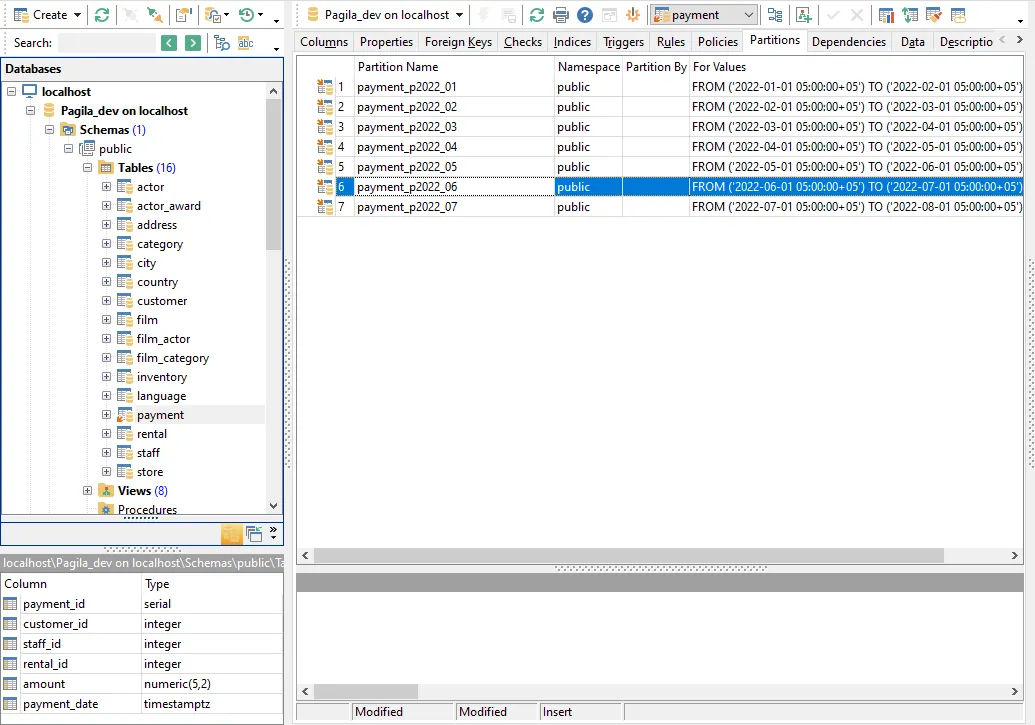
- Every kind of table. Create ordinary, temporary, foreign and partitioned tables, define partition keys and bounds, and manage indexes, constraints and triggers on separate tabs.
- Row-level security without memorizing syntax. Enable or force RLS on a table and create, edit or drop its policies in a dedicated editor.
- Types and advanced objects. Domains, enumerated, range, composite and base types, as well as collations, operators, aggregates and extended statistics, each with its own editor.
- External data and extensions. Set up foreign data wrappers and foreign servers, import remote tables through
postgres_fdw, and install or remove extensions in the Extensions manager. - ER diagrams in both directions. Reverse-engineer an existing database into a diagram, or design new tables and relationships visually and apply them to the database.
- SQL preview before every change. Every change you make in an editor goes through a preview window that shows the generated statements, so you can review and edit them before they run.
Control who can do what
In PostgreSQL, what a role can actually do depends on direct grants, role membership and privileges given to PUBLIC. SQL Manager brings all of it into view, so you can review and change access without piecing it together from system catalogs.
- One editor for all roles. Create login roles for users and group roles for teams, manage membership and set attributes such as LOGIN, CREATEDB or BYPASSRLS in one place.
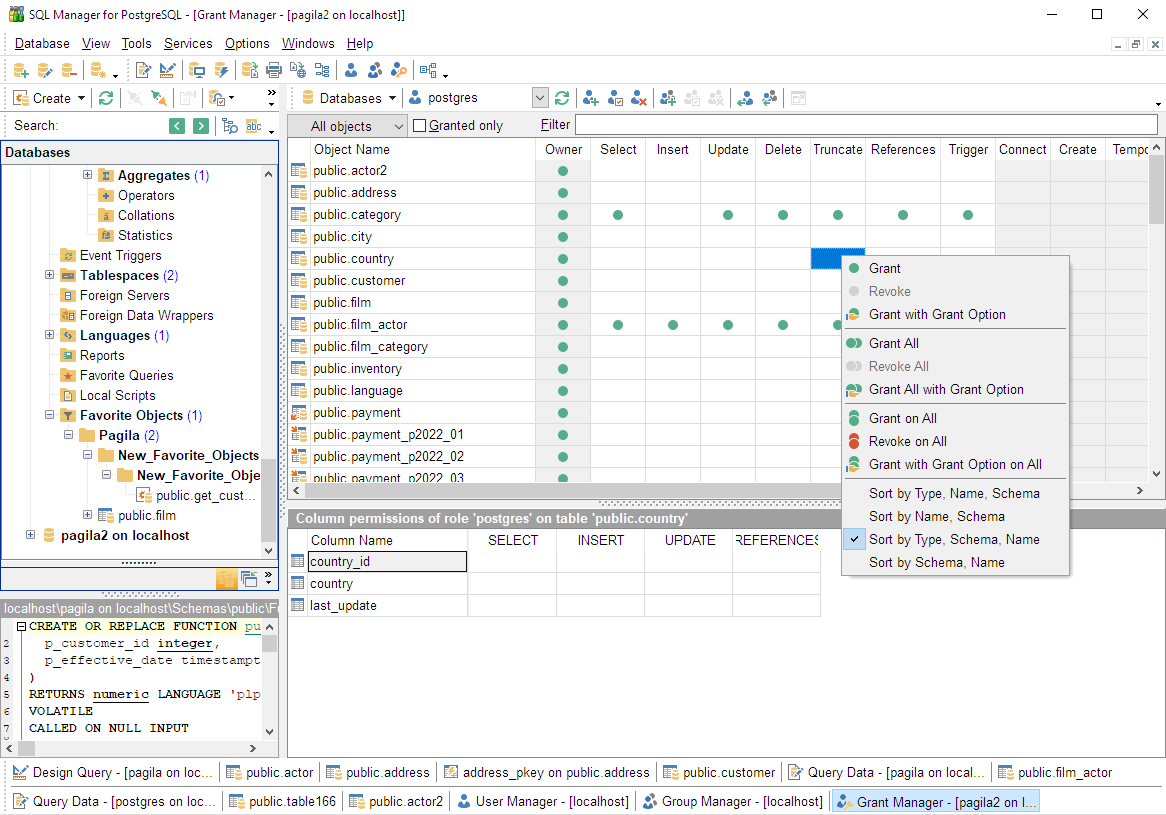
- Grant Manager across the whole server. Review and change privileges on databases, schemas, tables, views, functions, sequences, languages and tablespaces in a single grid, and filter it by role to see every privilege that role has been granted.
- Row-level security per role. Define which rows each role can see or modify with RLS policies, managed in the table editor alongside columns and indexes.
- Per-role configuration. Assign parameters such as
work_memorsearch_pathto a role, so its sessions start with the right settings automatically.
In-purchase Benefits
- FREE One Year of Maintenance already included!
- FREE software updates and upgrades during Maintenance period!
- FREE and unlimited Technical Support during Maintenance period!
- Reasonable pricing for Maintenance renewal – from 35% per Year!
- Volume discounts when buying two or more copies of one product
- Cross-selling discounts on related products
- 30-day money-back guarantee
Frequently Asked Questions
For a single database, create a logical backup with pg_dump and restore it using psql or pg_restore; use pg_dumpall to include roles and every database, or a physical base backup when you need point-in-time recovery. Always test a restore on a separate instance before you rely on it. SQL Manager for PostgreSQL runs backup and restore through a guided wizard and lets you restore to a chosen server in a few clicks.
Grant access to existing tables with GRANT SELECT, INSERT, UPDATE, DELETE ON ALL TABLES IN SCHEMA public TO your_user, and add GRANT USAGE ON SCHEMA public so the role can see the schema. This only covers tables that exist right now, so use ALTER DEFAULT PRIVILEGES to apply the same rights to tables created later. SQL Manager for PostgreSQL manages roles, schema and table privileges, and default privileges in a visual editor, so you can review and adjust access without writing GRANT statements by hand.
On the server, set listen_addresses in postgresql.conf so PostgreSQL accepts external connections, add a matching host rule to pg_hba.conf for the client's IP and authentication method, then open port 5432 in the firewall and reload the configuration. From the client you connect with the host, port, database, user, and password, ideally over SSL. SQL Manager for PostgreSQL stores all of this in a connection manager, so you can save, organize, and reconnect to remote servers without retyping connection details.
Start by running EXPLAIN ANALYZE on the query to see its real execution plan and find sequential scans, expensive sorts, or rows the planner misestimated. Most slow queries are fixed by adding a targeted index, rewriting a join, or refreshing statistics with ANALYZE, while pg_stat_statements helps you find the worst offenders across the whole server. EMS SQL Manager for PostgreSQL visually displays the execution plan with the cost of each element, allowing you to diagnose and fix slow queries without having to analyze the plan source code. The resulting plan can be exported and used for future comparison.
Define a table with CREATE TABLE, listing its columns, data types, a primary key, and any foreign keys or constraints, then speed up lookups with CREATE INDEX, which builds a B-tree index by default. Choose the column order and index type (B-tree, GIN, GiST) based on how you actually query the data. SQL Manager for PostgreSQL includes a visual table and index designer, so you can model columns, keys, constraints, and indexes in a GUI and apply the generated DDL without writing SQL.
Pricing & Licenses
Subscription — recurring monthly or annual payments. Updates and technical support are included while your subscription is active.
Business Licenses
Individuals & Non-profits
Perpetual license — buy once and keep the software forever. Each option below includes 1–3 years of maintenance (updates + support). Pick the term that suits you and renew anytime.
Business Licenses
Individuals & Non-profits
SQL Manager for PostgreSQL
Get started with SQL Manager for PostgreSQL
Download a fully-functional 14-day free trial, and start saving time with your database management today.
Download free trialGot questions?
If you'd like any help, or have a question about our tools or purchasing options, just get in touch.
SQL Manager is part of the SQL Management Studio
Perform even more tasks on the development, administration, and maintenance of your database, saving up to 55%!
Learn more