
Online Documentation for EMS SQL Management Studio for PostgreSQL
Template Management
For your convenience, SQL Management Studio for PostgreSQL allows you to create new templates and manage existing ones. All these operations can be performed with the help of the Template Management section.
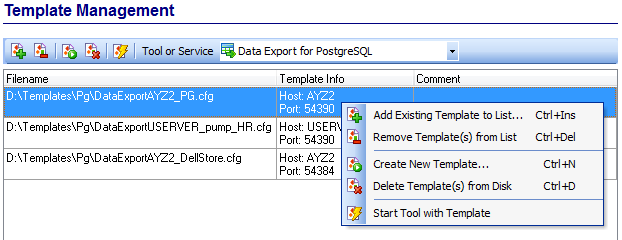
The Template Management section enables you to:
 Add Existing Template to List
 Remove Template(s) from List
 Create New Template
 Delete Template(s) from Disk
 Start Tool with Template
The same operations can be performed by using the corresponding items of the context menu.
To create a new template, select the corresponding context menu item or click the appropriate button on the Templates toolbar. Depending on the utility or service for which the template should be created, SQL Management Studio for PostgreSQL will run the appropriate tool or service dialogs. While working with the steps of the wizard, you can enter all the settings and save them as a template at the last step.
The drop-down list allows you to filter templates according to the selected SQL Studio tool/service.