
Online Documentation for SQL Manager for InterBase/Firebird
Setting field defaults
The Use default value group allows you to define the default value for the column, i.e. the value that is entered when no other entry is made
To activate the group, enable the  Use default value option.
Use the provided controls to specify the default field value.
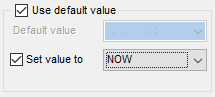
Default value
Type in the preferable default value for a domain. The data type of the default expression must match the data type of the field:
- for integral (SMALLINT, INTEGER) and floating-point (FLOAT, NUMERIC, DOUBLE PRECISION, DECIMAL) data types, use the spinner control to specify the necessary value;
- for string data types (CHAR, VARCHAR), use the editable area to input the necessary text;
- for temporal data types (DATE, TIME), type in or click the arrow-down button to call the Date editor popup window and set the required date value.
Set value to
Use the drop-down list to select the default value for a field of the selected datatype.
Note that the default value set for the field based on a domain in the Field Default group of Field Editor will override the corresponding value set for the domain.


































































