
Online Documentation for SQL Manager for InterBase/Firebird
Options for domain-based field
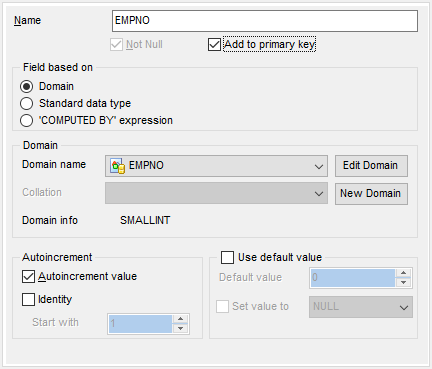
If you select the  Domain option of the Field based on group indicating that the field being created/edited is based on a domain, you should specify domain-specific options.
Domain
Domain name
Use the drop-down list of existing domains to select the domain to be used for the field.
 Autoincrement value and Identity
These options are only available if the selected domain is based on a numeric data type. For details see Defining autoincrement.
Collation
This setting is only available if the selected domain is based on a string data type. Use the drop-down list to select the collation order to be used for string data stored in the column.
To edit the selected domain using Domain Editor, click the Edit Domain button.
To create a new domain for the field using Domain Editor, click the New Domain button.
Domain info
This group allows you to view basic information on the selected domain.
Use default value
Enable this option to specify the value this field will take by default. For details see Setting field defaults.


































































