
Online Documentation for SQL Manager for InterBase/Firebird
Specifying database parameters
Use this step of the wizard to set the necessary connection parameters for the database being created.
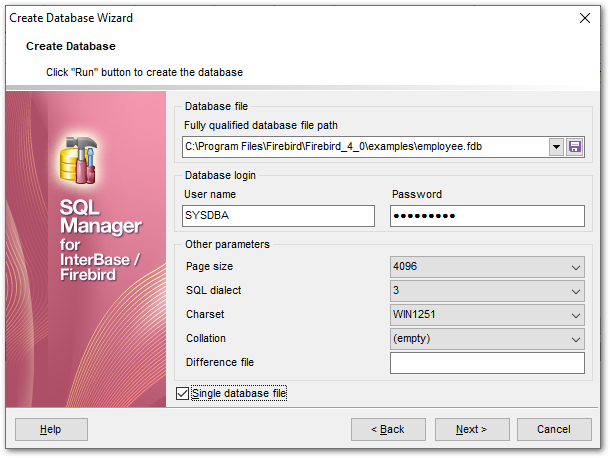
Database file
Fully qualified database file path
This field requires new database file specification, including full name of the database file. Type in or use the  button to specify the path to the database file. The drop-down list contains the previously specified paths.
Database login
User name
Specify a user name (checked against valid user name and password combinations in the security database on the server where the database will reside).
Password
Specify the password (checked against valid user name and password combinations in the security database on the server where the database will reside).
Other parameters
Page size
Size (in bytes) for database pages. Possible values are 1024, 2048, 4096 (default), or 8192.
SQL dialect
Declares the SQL Dialect for database access.
|
SQL dialect |
Used for |
|
1 |
InterBase 5.5 and earlier compatibility |
|
3 |
InterBase 6.0; allows you to use delimited identifiers, exact numerics, and DATE, TIME, and TIMESTAMP datatypes |
Charset
Use the drop-down list to select the default character set for the database, i.e. the character set used by the server for string (CHAR, VARCHAR, text Blob) columns in the database when no other character set information is provided.
Collation
Select the appropriate sorting option in this list.
Difference file
Optional clause specifying the path and name for the file delta that stores any mutations to the database file after it has been switched to the “copy-safe” mode.
 Single database file
If you want to store your new database in several files, uncheck this option. By default this option is checked, it means that the database is stored in one file only.
Click the Next button to proceed to the Defining database files step of the wizard, or to the Viewing result SQL statement step, depending on the Single database file option selection.


































































