
Online Documentation for Data Import for InterBase/Firebird
General
General
Theme
Select the main color theme for the application: Light or Dark.
 Confirmation on exit
Enables/disables confirmation upon exiting the program.
Key columns reminder
Use this option to enable/disable prompts to define key columns.
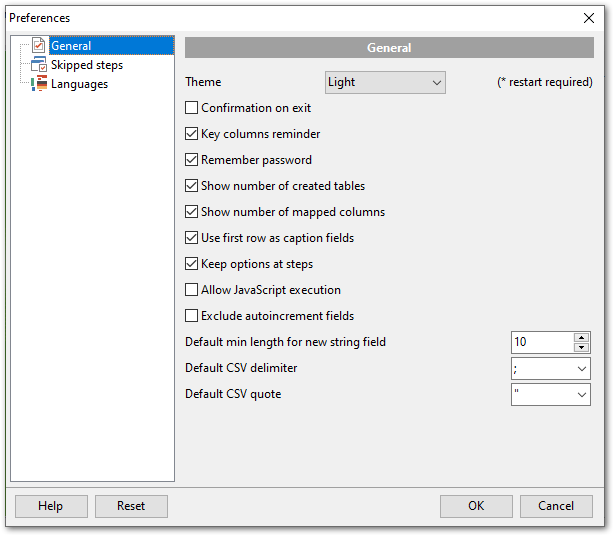
Remember password
Setting this option allows you to save passwords used for access to the databases automatically upon closing the application. Please note that checking this option saves the latest password used for connection to the database (including the SSH server password).
Show number of created tables
Use this option to allow/disallow appearance of the correspondent information window.
Show number of mapped columns
Displays the number of mapped fields on proceeding to Step 4.
Use first row as caption fields
Enable this option to use first rows as captions when mapping fields.
Keep options at steps
If this option is checked all your import settings will remain the same the next time the program is started.
Allow JavaScript execution
If this option is checked then the script entered on the Step 6 is always executed.
Exclude autoincrement fields
If this option is checked then autoincrement fields will not be mapped on auto mapping.
Default min length for new string field
Specify the default length of the new field in case you are importing data into a new table.
Default CSV delimiter
Specify the default delimiter for CSV files format.
Default CSV quote
Specify the default quottas for CSV files format.
|
See also: |
|
|
|
|


































































