
Online Documentation for SQL Manager for DB2
Rollforward Database
Rollforward Database Wizard allows you to perform the database rollforward operation on your DB2 system.
This operation is used to recover a database by applying transactions recorded in the database log files. Invoked after a database or a table space backup image has been restored, or if any table spaces have been taken offline by the database due to a media error. The database must be recoverable (that is, the logarchmeth1 or logarchmeth2 database configuration parameters must be set to a value other than OFF) before the database can be recovered with rollforward recovery.
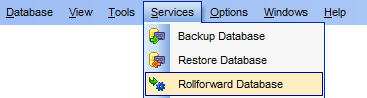
To run the wizard, select the Services |  Rollforward Database main menu item, or right-click the database alias in the DB Explorer tree and select the Database Operations | Rollforward Database context menu item.
|
Availability: |
|
|
Full version (for Windows) |
Yes |
|
Lite version (for Windows) |
No |
|
Note: To compare all features of the Full and the Lite versions of SQL Manager, refer to the Feature Matrix page. |
|
|
See also: |


































































