
Online Documentation for SQL Manager for DB2
Creating/editing server
Use the Edit tab of Server Editor to create/edit a server and specify its definition.
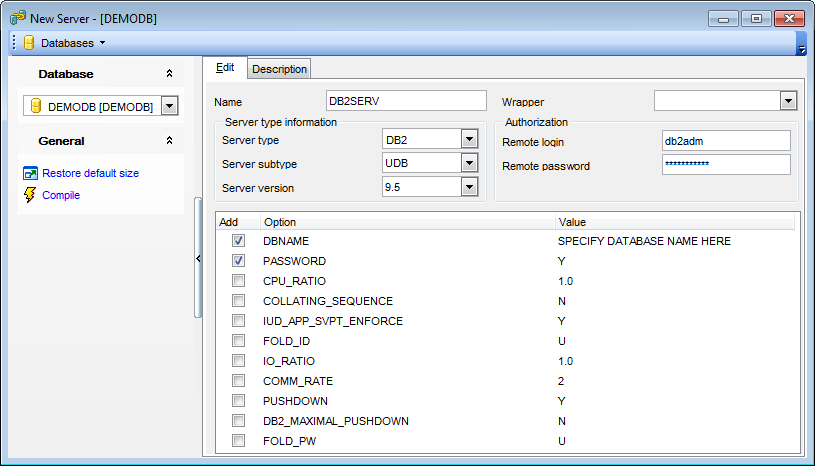
Name
Enter the name of the data source that is being defined to the federated database.
Wrapper
Use the drop-down list to select the wrapper that the federated server uses to interact with data sources of the type and version denoted by Server type and Server version.
Server type information
Server type
Use the drop-down list to specify the type of data source denoted by Server name. Possible values are: DB2, INFORMIX, MS SQL, ODBC, ORACLE, SYBASE.
Server subtype (for DB2 and Oracle types only)
Use the drop-down list to specify the subtype of data source denoted by Server name.
Server version
Use the drop-down list to specify the version of the data source denoted by Server name.
Authorization
Remote login
Specifies the authorization ID under which any necessary actions are performed at the data source.
Password
Specifies the password associated with the authorization ID represented by Remote login. If password is not specified, it will default to the password for the ID under which the user is connected to the federated database.
Options
This area lists available server options which can be added to the server definition. Assign values for options where necessary.
DBNAME
Name of the data source database that you want the federated server to access. For DB2 database, this value corresponds to a specific database for the initial remote DB2 database connection.
PASSWORD
Specify whether passwords are sent to a data source. If you want passwords to be sent to the data source and validated then choose the 'Y' item of the drop-down list. Otherwise, select the 'N' item.
CPU_RATIO
Indicates how much faster or slower a data source CPU runs than the federated server CPU. Valid values are greater than 0 and less than 1x10²³.
COLLATING_SEQUENCE
Specifies whether the data source uses the same default collating sequence as the federated database, based on the NLS code set and the country/region information.
'Y'
The data source has the same collating sequence as the DB2 federated database.
'N'
The data source has a different collating sequence than the DB2 federated database collating sequence.
'I'
The data source has a different collating sequence than the DB2 federated database collating sequence, and the data source collating sequence is insensitive to case (for example, 'STEWART' and 'StewART' are considered equal).
IUD_APP_SVPT_ENFORCE
Specifies whether the DB2 federated system should enforce detecting or building of application savepoint statements.
'Y'
The federated server rolls back insert, update, or delete transactions if an error occurs in an insert, update, or delete operation and the data source does not enforce application savepoint statements.
'N'
The federated server will not roll back transactions when an error is encountered. Your application must handle the error recovery.
FOLD_ID
Applies to user IDs that the federated server sends to the data source server for authentication.
Valid values are:
'U'
The federated server folds the user ID to uppercase before sending it to the data source.
'N'
The federated server does nothing to the user ID before sending it to the data source.
'L'
The federated server folds the user ID to lowercase before sending it to the data source.
IO_RATIO
Denotes how much faster or slower a data source I/O system runs than the federated server I/O system. Valid values are greater than 0 and less than 1x10²³.
COMM_RATE
Specifies the communication rate between the federated server and the data source server. Expressed in megabytes per second.
Valid values are greater than 0 and less than 1x10²³.
PUSHDOWN
'Y'
DB2 UDB will consider letting the data source evaluate operations.
'N'
DB2 UDB will send the data source SQL statements that include only SELECT with column names. Predicates (such as WHERE=) column and scalar functions (such as MAX and MIN), sorts (such as ORDER BY or GROUP BY), and joins will not be included in any SQL sent to the data source.
DB2_MAXIMAL_PUSHDOWN
Specifies the primary criteria that the query optimizer uses when choosing an access plan. The query optimizer can choose access plans based on cost or based on the user requirement that as much query processing as possible be performed by the remote data sources.
'Y'
The query optimizer chooses an access plan that pushes down more query operations to the data source than other plans. When several access plans provide the same amount of pushdown, the query optimizer then chooses the plan with the lowest cost.
If a materialized query table (MQT) on the federated server can process part or all of the query, then an access plan that includes the materialized query table is might be used.
'N'
The query optimizer chooses an access plan based on cost.
FOLD_PW
Applies to passwords that the federated server sends to data sources for authentication. Valid values are:
'U'
The federated server folds the password to uppercase before sending it to the data source.
'N'
The federated server does nothing to the password before sending it to the data source.
'L'
The federated server folds the password to lowercase before sending it to the data source.


































































