
Online Documentation for SQL Manager for DB2
Creating/editing table space
Use the Property tab of Tablespace Editor to create/edit a table space and specify its definition.
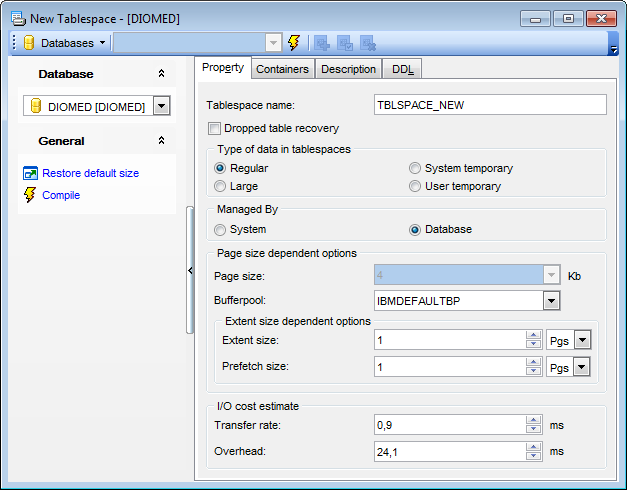
Tablespace name
Enter a name for the new table space (this is a one-part name).
 Dropped table recovery
Use this option if you wish to recover dropped tables in the specified table space (with the RECOVER TABLE ON option of the ROLLFORWARD command used). This option is only available for a REGULAR table space.
Type of data in tablespaces
 Regular
If this type is selected, all data except for temporary tables are stored in the table space.
Large
If this type is selected, long or LOB table columns and structured type columns or index data are stored in the table space.
System temporary
If this type is selected, temporary tables (work areas used by the database manager to perform operations such as sorts or joins) are stored in the table space.
User temporary
If this type is selected, declared global temporary tables are stored in the table space.
Managed by...
System
If this option is selected, the table space will be a system managed space (SMS) table space.
Database
If this option is selected, the table space will be a database managed space (DMS) table space.
Page size dependent options
Define the Page size and the Buffer pool values for the table space.
Page size
Define the size of pages used for the table space. The valid values are 4, 8, 16, 9 or 32.
Bufferpool
The name of the buffer pool used for tables in this table space. If the buffer pool is not specified, the default buffer pool (IBMDEFAULTBP) is used. The page size of the buffer pool must match the page size specified (or defaulted) for the table space.
Extent size dependent options
Define the Extent size and the Prefetch size values (in pages, kilobytes, megabytes or gigabytes) for the table space.
Extent size
Specify the number of PAGESIZE pages that will be written to a container before skipping to the next container.
Prefetch size
Specifies the number of PAGESIZE pages that will be read from the table space when data prefetching is being performed.
I/O cost estimate
Define the Transfer rate and the Overhead values (in milliseconds) for the table space.
Transfer rate
Enter any numeric literal (integer, decimal, or floating point) that specifies the time to read one page into memory, in milliseconds. The number should be an average for all containers that belong to the table space, if not the same for all containers.
Overhead
Enter any numeric literal (integer, decimal, or floating point) that specifies the I/O controller overhead and disk seek and latency time, in milliseconds. The number should be an average for all containers that belong to the table space, if not the same for all containers.


































































