
Online Documentation for SQL Manager for DB2
Creating/editing trusted context
Use the Trusted Context tab of Trusted Context Editor to create/edit a trusted context and specify its definition.
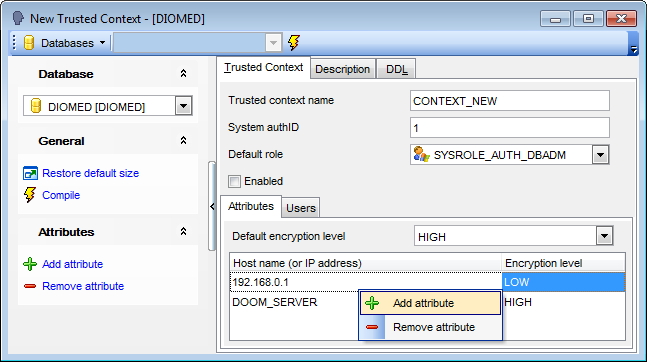
Trusted context name
Name the trusted context to be created.
System authID
This field specifies that the context is a connection established by system authorization.
Default role
Specify the role which is the default role for the trusted context.
 Enabled
Check this option to specify that the trusted context is created in the enabled state.
Attributes
Specify a list of one or more connection trust attributes upon which the trusted context is defined.
Note: Attributes can be added and removed with the help of corresponding context menu or Navigation bar items.
Default encryption level
Specify the minimum level of encryption of the data stream or network encryption.
Host name (or IP address)
Specify the actual communication address used by the client to communicate with the database server.
Encryption level
Specify a the level of encryption for selected specific address:
NONE, no specific level of encryption is required.
LOW, a minimum of light encryption is required.
HIGH, Secure Socket Layer (SSL) encryption must be used for data communication between the client and the DB2 server if an incoming connection is to match the encryption setting for this specific address.
Users
At this tab you can specify who can use a trusted connection based on this trusted context.
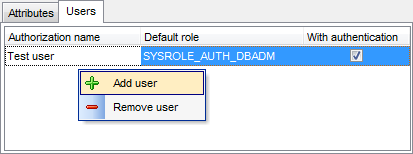
Authorization name
Define a user that can use this trusted connection.
Note: Users can be added and removed with the help of corresponding context menu or Navigation bar items.
Default role
Specifies that role-name is the role to be used for the user when a trusted connection is using the trusted context.
With authentication
Specifies that switching the current user on a trusted connection to this user requires authentication.


































































