
Online Documentation for All SQLManager.net Products
Report bugs and suggestions
If you want to report a bug occurred in the application or just provide some feedback you can do it directly from the SQL Angel. Before reporting bugs and suggestions make sure you are using the latest version of the SQL Angel.
To create an e-mail with attached bug report files automatically do the following:
- select the server on which the problem occurred in the Servers tree;
- choose the Send bug report to EMS its context menu item;
- after a while the default mail client installed on your computer will be opened with newly created letter having bug report files attached to it;
- in the generated e-mail describe the steps to reproduce the occurred bug and send the letter.
If due to some reasons the e-mail creation failed or the report sending was cancelled the following dialog appears.
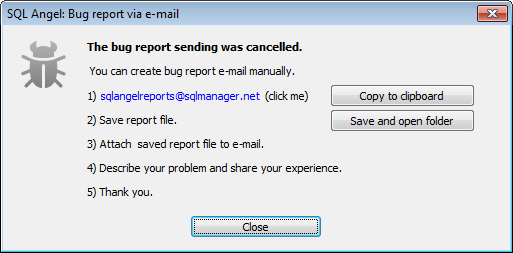
Follow the given instructions to create bug report e-mail manually:
- click the "mailto:" link sqlangelreports@sqlmanager.net to open mail client, or in case no client has been opened copy the address by clicking the Copy to clipboard button and create e-mail in a preferable client;
- click the Save and open folder button and define the directory where the bug report file should be saved; after the file is saved the defined directory will be opened automatically;
- attach the saved file to the created e-mail;
- describe the steps to reproduce the occurred bug and send the letter.


































































