
Online Documentation for All SQLManager.net Products
General
At this page you can edit general options of the step.
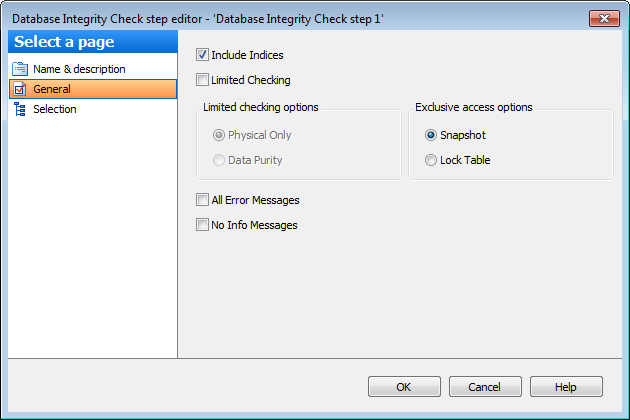
 Include Indices
The option indicates that indices are included in database integrity check.
Limited Checking
Use this option if you need to restrict database integrity check.
 Physical Only
This option (PHYSICAL_ONLY) limits the checking operation to the integrity of the physical structure of the page and record headers, the physical structure of B-trees and the allocation consistency of the database. Designed to provide a small overhead check of the physical consistency of the database, this check can also detect torn pages, checksum failures, and common hardware failures that can compromise a user's data.
Data Purity
If this option (DATA_PURITY) is enabled, the DBCC CHECKDB statement checks the database for column values that are not valid or out-of-range.
Exclusive access options limits the checks that are performed:
Snapshot
Enable the option to use an internal database snapshot for the transactional consistency needed to perform database integrity checks.
Lock Table
If this option (TABLOCK) is used, the DBCC CHECKDB statement obtains locks instead of using an internal database snapshot. This includes a short-term database exclusive lock.
All Error Messages
This option (ALL_ERRORMSGS) displays an unlimited number of errors per object.
No Info Messages
This option (NO_INFOMSGS) suppresses all informational messages.


































































