
Online Documentation for All SQLManager.net Products
FTP Connection
The FTP Connection Settings dialog is provided for configuring FTP Server connection for uploading backup files.
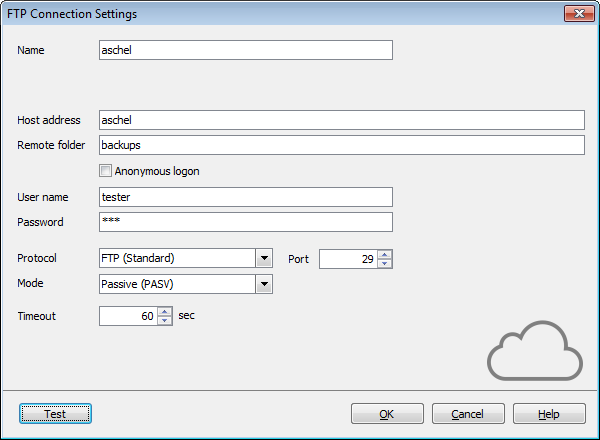
Name
Specify the name for the connection. The connection name must be unique among all that were already created.
Host address
Define the FTP host address. Here you can enter server name or its IP address (without specifying protocol).
Remote folder
Define the directory on the FTP server where backup files will be uploaded. If the specified directory does not exist on the server it will be created on the first upload process.
Set the authentication parameters for uploading backup files to the specified FTP server. Note that the specified user should have sufficient rights to write to the target folder. You can choose  Anonymous logon or provide User name and Password in the corresponding fields.
Protocol
Select the protocol that should be used for backup files transferring. The possible values are:
- FTP (Standard)
- FTPS (Implicit SSL/TLS)
- FTPS (Explicit SSL/TLS)
Port
Specify the port the FTP connection should be executed through.
Mode
Select the mode of the FTP connection. The possible values are:
- Passive (PASV)
- Active (PORT)
Timeout
Specify the timeout in seconds when a connection will be timed out because of inactivity on the data channel.
You can check the access to the specified folder by clicking the Test button. You will be offered to select servers over which the connection should be checked.
If the specified remote folder does not exist it will be created on performing test access.


































































