
Online Documentation for All SQLManager.net Products
Selecting files/folders for cleanup
At this step you need to define server(s) and file and/or folder selection for them.
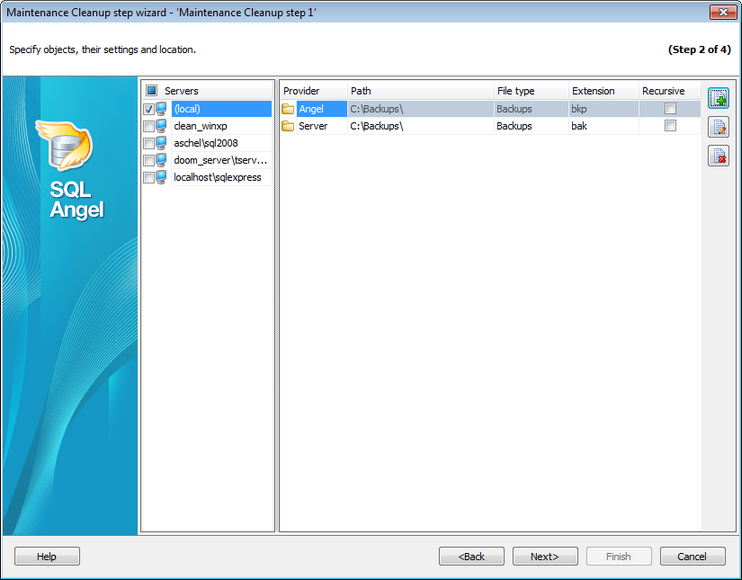
Servers
Select the servers to run the operation on. If the servers name icon is grayed out the Angel service is not run (installed) or there is no connection to the server.
Note: Selecting servers is not available in Template mode.
Use  Add file or folder specification to add a cleanup destination and
  Edit specification,
  Remove selected specification for appropriate actions.
Cleanup specification
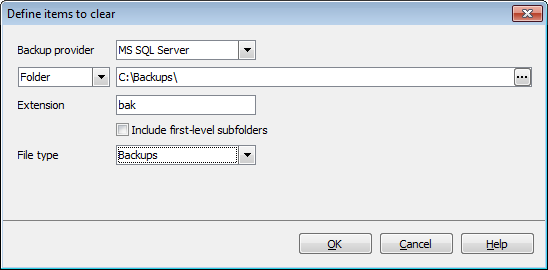
Backup provider
Select whether the files created by SQL Angel or SQL Server will be cleaned.
Folder
Set the search folder for the files. The path is set relatively to the server which you selected in the Server list.
If the MS SQL Server has been selected as a Backup provider then you can define the path and name of the specific backup File to be deleted.
Extension
Specify the custom extension for backup or report files if it differs from the default.
Enable  Include subfolders option if you need to cleanup all sub-folders of the specified folder.
File type
Use this drop-down list to specify the the type of files to be deleted:
- Backups - backup files;
- Reports - text reports of previously run maintenance plans.
Note: This drop-down list is available if the MS SQL Server has been selected as a Backup provider.


































































