Online Documentation for All SQLManager.net Products
Defining set of tasks
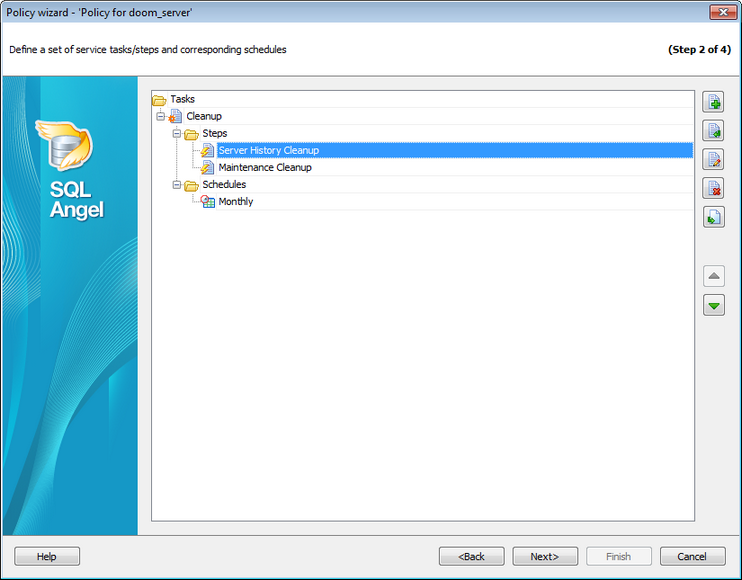
At this step you need to define tasks for the policy being created.
Policy is a set of schedule(s) and tasks each containing at least one step.
 Create New
Use this button, Ins key or the  Add button in the task\step\schedule header to create a new object.
 Create New from Template
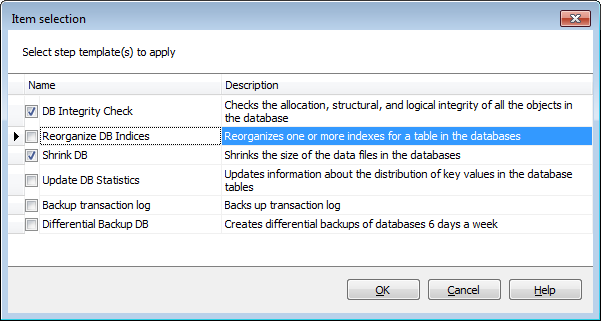
If you create a task\step\schedule from a template you need to pick a template for this object in the opened dialog.
Edit
You can use this button or click the  Edit button in the object header to edit the object.
 Delete
Click this button or the  Delete button in the object header to remove it from the list. The Delete key can be used as well.
 Copy to Templates
Press this button to create a template with the same options as the selected object.
Use  and
and  buttons to reorder Tasks, Steps and Schedules. The order of objects is important for Steps, they are executed in the set order starting from the top.
Note: Backup and restore processes of databases situated on the same instance cannot be executed simultaneously.
When you create a new object from the template the following Templates list dialog is opened. You need to check the items you need to add and click the OK button. If you check several items the corresponding number of policies will be created.