
Online Documentation for All SQLManager.net Products
Selecting instances
At this step you should select the appropriate action for each instance of the server.
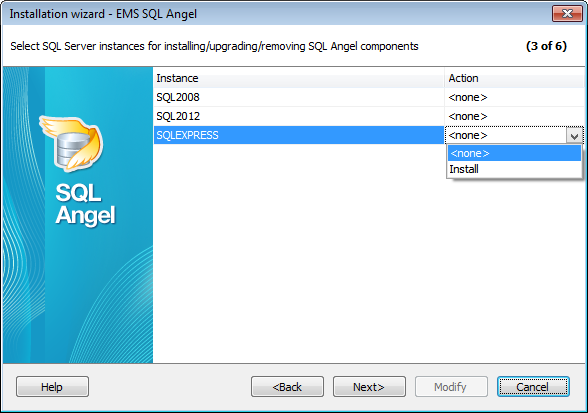
Use the Action field to select an action for each server instance to be executed:
- Install services
- Update services
- Remove services
If you choose the Install item the dialog window for setting instance connection parameters appears.
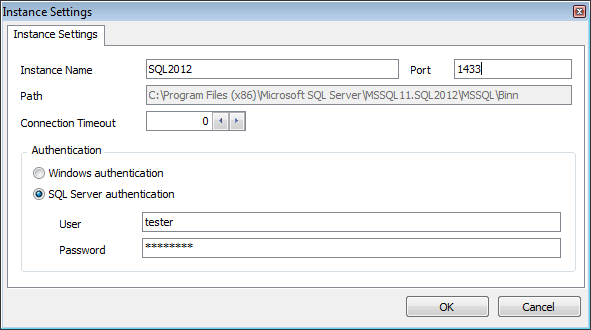
Instance name
Use this field to edit instance name.
Port
Identify the TCP/IP port used by the SQL Server Instance.
Path
Define the local path to the server.
Connection Timeout
Specify time to wait while trying to establish a connection to the instance before terminating the attempt and generating an error
Authentication
Specify the type of Microsoft® SQL Server™ authentication to be used for the connection:  Windows authentication or SQL Server authentication. It is strongly recommended to avoid using SQL Server authentication with "sa" as the login.
Windows Authentication
SQL Angel identifies a user by his domain name and password which are defined automatically according to his Windows domain user account.
Defined authorization parameters will be used by installable service to connect to the SQL Server instance on the server. Afterwards they can be edited using the Service Properties dialog.
SQL Server authentication
SQL Angel identifies user by his server login and password. Login and password management is accomplished by Login Manager.
If Server authentication is selected as the authentication type, you should provide authorization settings: User and Password. Analyzing them a system determines information and therefore object access permissions.


































































