
Online Documentation for SQL Manager for MySQL
Using Navigation bar and Toolbar
The Navigation bar and Toolbar provide quick access to tools implemented in Database Registration Manager.
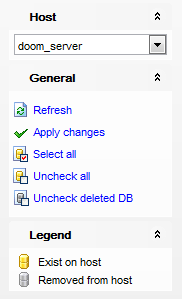
The Navigation bar of Database Registration Manager allows you to:
Host group
 select a host
General group
 Refresh the list of databases
 Apply changes - register selected databases
 Select a database located on the host, but not registered in <PRODUCT_TITLE>
 Uncheck all
 Uncheck deleted DB
Legend group
 indicates existing database
 indicates removed from host database
Items of the Navigation bar are also available on the ToolBar of Schema Editor. To enable the toolbar, open the Environment Options dialog, proceed to the Windows section there and select  Toolbar (if you need the toolbar only) or Both (if you need both the toolbar and the Navigation bar) in the Bar style for child forms group.


































































