
Online Documentation for DB Comparer for MySQL
Opening / saving project
To open an existing DB Comparer project, select Project | Open Project... or use the  Open Project...button on the toolbar (Ctrl+O).
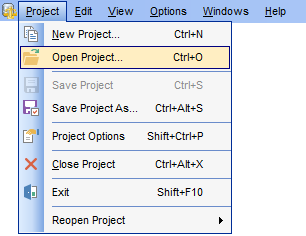
To save a DB Comparer project, select Project | Save Project (Save Project As...) or use the  Save Project (
 Save Project As) button on the toolbar (Ctrl+S / Ctrl+Alt+S). In the Project Options select Save Project button to save the currently edited project.
If this is the first time that this project is being saved or if you select Save Project As..., you are to specify the path to the project file and provide a name for the project file within the Save project options dialog.
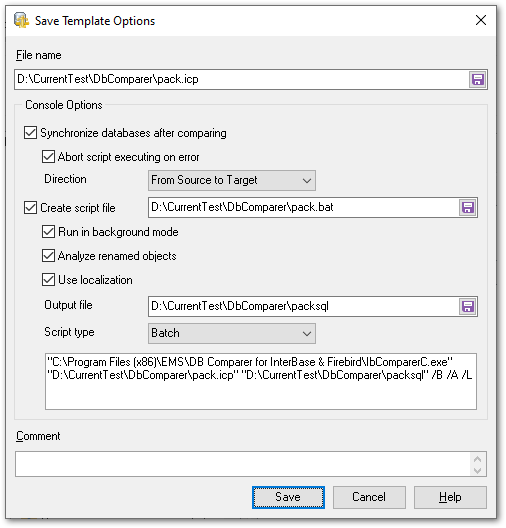
Console options
 Synchronize databases after comparing
With this option the generated script is executed right after comparing. With this option disabled, the synchronization script is saved without executing.
Abort script executing on error
This option specifies whether the synchronization script must be aborted on the error.
Direction:
Select the database synchronization direction.
Create script file
Enable to specify the path to create a command file for Command Line or PowerShell.
Run in background mode
Enable to add the /B option and run the file in the background mode.
Analyze renamed objects
Enable to add the /A option for comparison in the console application with the Analyze renamed objects option.
Use localization
Enable it to add the /L option and output text in the console application on the same language as in the GUI.
Output file
Specify the directory to save the text file with SQL script.
Script type
Select Batch or PowerShell type of the file with the command.
Comment
Add custom text to describe the project. This info is saved to the template file in [#Comment#] section.


































































