
Online Documentation for Data Import for MySQL
Step 11 - Start of data import process
This step of the wizard is intended to inform you that all import options have been set, and you can start the import process. If everything is correct, press the Import button to start the process. If you want to change something, you can return to any of the wizard steps using the Back button.
 Continue if before import script is executed with errors
Check this option to ignore errors in Before Script execution during import.
Execute after import script on import fail
Check this option to execute After import script, specified at Step 10, not depending on import result. Otherwise the script is not executed if import fails.
Max import threads
Set the value from 0 to 64 to adjust import performance.
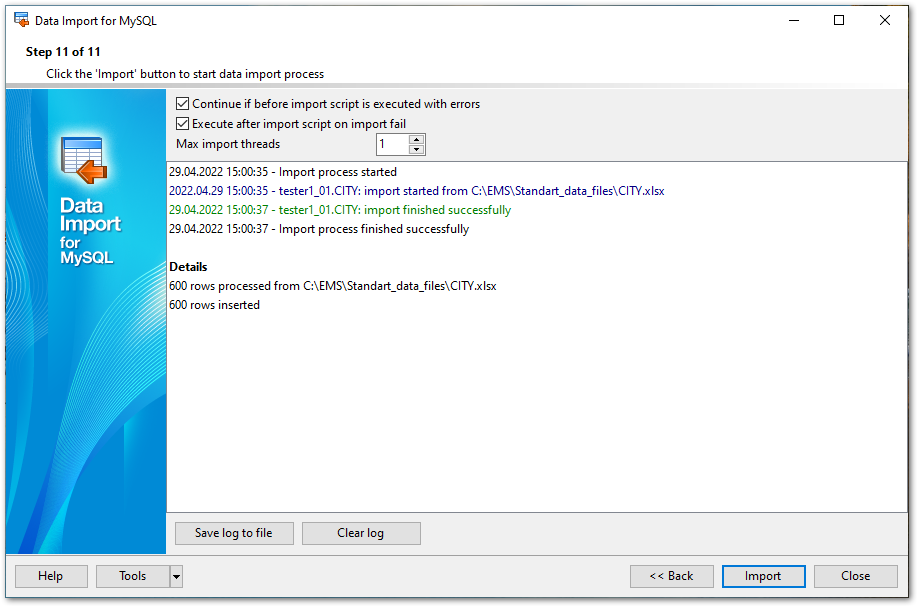
Save log to file
This button calls the Save file dialog which allows you to save the on-screen log to a file.
Clear log
Pressing this button clears the on-screen log area, removing all messages.
If necessary, you can save a template for future use.
Click the Import button to start the import process.


































































