

Online Documentation for SQL Manager for SQL server
Using the context menu
The context menu of the grid is aimed at facilitating your work with data: you can perform a variety of operations using the context menu items:
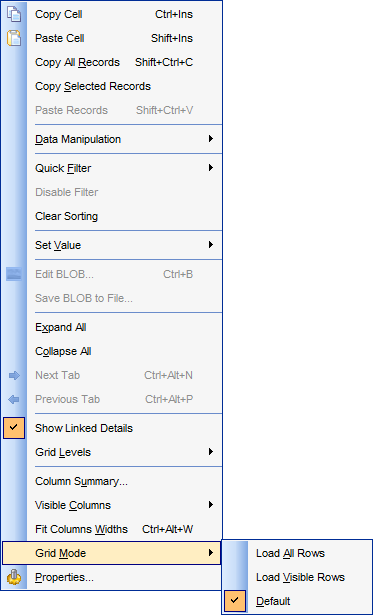
- copy the selected cell value to Windows clipboard;
- paste the clipboard content to the currently selected cell;
- copy/paste multiple records;
- data manipulation: Export Data from the table, Import Data to the table, Export Data as SQL Script, Bulk Insert;
- set/disable Quick Filter;
- clear sorting;
- set a value for the selected cell: NULL, Empty string (for string fields), Now (for TIME fields), "Zero" (for DATE fields);
- edit the BLOB value or save the BLOB to file using BLOB viewer/editor;
- show linked details (automatically add grid levels on the basis of existing foreign keys)
- expand/collapse grid levels and navigate within the tabs;
- manage grid levels: add a new grid level, delete the current grid level (this item is enabled only when the detail level exists and is currently focused);
- switch to the Card View mode;
- view Column Summary;
- select visible/invisible columns of the dataset;
- fit column width for better representation;
- specify the grid mode: Load All Rows, Load Visible Rows, Default;
- view/edit grid properties.
Note: If the  Show editor immediately and Always show editor options on the Environment options | Grid tab are checked then the context menu of a grid can be evoked by selecting the necessary cell and right-clicking the table header. Otherwise, right-clicking the cell evokes the cell editing menu.


































































