
Online Documentation for Data Export for SQL Server
Access options
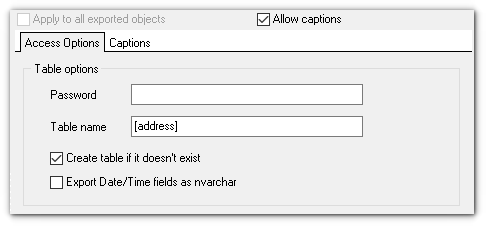
This tab allows you to set options for the target MS Access (*.mdb) and MS Access (*.accdb)file.
Set the name for the target table and specify whether the wizard should create a new table in the MS Access database if it does not exist yet, or use the existing table to export data into.
Password
Specify the database password if you are exporting data to an existing MS Access database which is protected by a password.
Table Name
The name of the table within the target MS Access database.
Create table if it does not exist
Automatically creates the target table if it does not exist in the target database yet.
Export Date/Time fields as nvarchar
Enable the option to convert Date/Time data to nvarchar when exporting.
 Apply to all exported objects
Enable this option to make settings common for all objects.
|
See also: |


































































